
Chapter 17 · Seedance 2.5

Part 3 · Motion
Seedance 2.5 takes words, stills, footage and sound in one job, makes picture and sound together, and can edit or extend a clip you already own. This chapter teaches how it reads each input, how to bind, place and protect your anchors when there is no start frame, how to work from footage, how to write its sound and its speaking shots, and what to check before you sign a clip.
In this chapter
What it takes in, what each input owns, and which tasks lock the result
References to video (bind, place, lock, protect); footage as a reference, an edit and an extension
The sound notation, and the speaking route for a new performance, including English dialogue generated with a chosen voice
The house amendment on a director's technique name
Templates, five examples, settings, checks, failures, limits, prices and rights
Before you start. Chapter 13 chooses the operation and writes the route line. Chapter 14 teaches the seven elements of a moving shot, and Chapter 10 the anchors. Chapter 22 sets the speaking-shot contract. This chapter maps them to one tool and does not repeat them.
17.1 What it is
Seedance 2.5 is ByteDance's video model, and it makes picture and sound in one pass. ByteDance Seed announced it on 31 Jul 2026, and it reached Higgsfield on 6 Aug. It is the current Seedance: BytePlus, ByteDance's developer cloud, lists it as dreamina-seedance-2-5-260628, updated its prompt guide on 28 Sep, and lists no later model, nor does ByteDance Seed (checked 30 Sep 2026). This chapter follows that guide and its tutorial, read in full on 30 Sep 2026.
The jobs it takes.
A shot composed from your anchors with no start frame: references to video.
A shot from a signed start frame, or from a start frame and an end frame.
A shot that borrows from footage (a rehearsal, a blockout or a clay previz lends its camera path and timing), and the edit or extension of an accepted clip.
A speaking shot, when a new performance is acceptable, and a long take of up to 30 seconds (one shot, one clip stays the default, 13.5).
The jobs it does not take.
A camera move whose size must be measured from a signed frame: Kling (Chapter 16).
Arabic dialogue typed as text. The maker lists Arabic among eleven languages, and a language list is not proof of a dialect. Egyptian and Saudi lines come from an actor or ElevenLabs (Chapter 21).
The exact recorded take: a wordless plate from this tool, then Sync Lipsync 3 (Chapters 22 and 24).
Titles, subtitles, logos, end cards and Arabic in the frame: composited in post (Chapter 30). And the same take twice: the connection offers no seed.
How it is reached. Through the Higgsfield connection as seedance_2_5 (Chapter 33), in four modes: t2v, the default, with nothing attached; omni_reference whenever a start frame, an image, a clip or a sound is attached; video_edit; and video_extension. The maker's own service (BytePlus ModelArk) offers more (17.6); where the connection lacks a control, the text names the fallback. Name seedance_2_5 in every request: when a request names no model, or carries an image, the host may offer a preset in place of a job. Decline it and resubmit.
17.2 How it reads what you give it
Seedance sorts a job by what you attach and by the intent of your words. It counts Image N, Video N and Audio N separately, in upload order, and reads the prompt top to bottom as a shot description.
Input | What it owns | How you bind it |
Words | the event, camera, time, sound, protection and ending | the prompt itself |
Start frame | frame 0, exactly; the result takes its aspect ratio | its slot; the words say what changes, never what the frame shows |
End frame | the landing; a frame of another shape is stretched | its slot; the words describe the travel between |
Image references | who, what and where: a face, a costume, a product, a place; never the frame | "Image N", a name, one job, a fence |
Video references | a camera path, a timing, where people stand; or the clip to edit or extend | "Video N" with the channel taken, or the task sentence |
Audio references | a voice's timbre, a rhythm, music; one may stand alone in a job | "Audio N" with one job |
Keyframes, storyboard image | states in order, or an order and shot sizes, loosely | below |
Number by first appearance, and say the mapping in words. Upload in the order the subjects first appear in the shot, and number them that way: the maker's own repair for a character who took another's face or voice. State the mapping in the prompt, not on the picture, since a name written inside an image can cause confusion or duplication. Use one form in a prompt ("Image 1" or "@Image 1"). Whether the connection keeps your upload order as the numbers is not yet known (17.10), so name every file by what it is as well as by its number.
A reference passes everything in it. A face reference also brings its backdrop, light and pose; a clip brings its actor, room, light and sound. Give each file one job and a fence ("take nothing of its kitchen"). Where two files could give the same thing, say which owns it or remove one; two face sources for one person average.
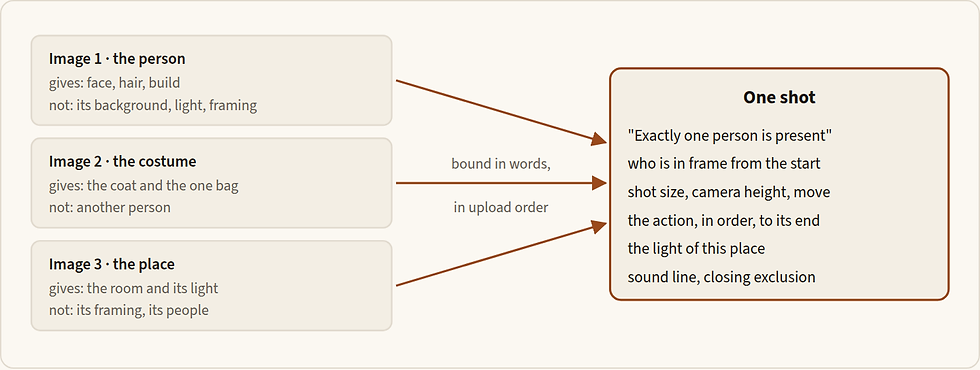
Figure 17.1 — A manifest. Each file has one job and one fence; the prompt binds them in upload order and adds what no file carries.
How an anchor enters a clip. There are two ways, and one shot uses only one (13.4). On the keyframe route the anchors make a still (Chapter 9) and the signed still goes in as the start frame: the clip's identity is the still's. On the reference route the anchors go in as image references and the model composes the frame. For a face, attach the master, or the in-look anchor when the film's light is fixed (10.2); if the shot's light differs, fence it: "take nothing of its light". Add the product master and a place plate with nobody in it.
Tasks lock the result.
Task | Aspect of the result | Length of the result |
Text, references, keyframes, storyboard | yours: 21:9, 16:9, 4:3, 1:1, 3:4, 9:16 or adaptive | yours: 4 to 30 s, or -1 |
Start frame, or start and end frames | that of the frame | yours |
Edit | that of the source | that of the source; up to about 0.3 s short unless the source has 8n+1 frames |
Extension | that of the source | yours |
A frame sent as an ordinary image reference locks nothing and only approximates the frame; sent in its own slot it locks the aspect and is followed strictly. So a vertical version of a horizontal clip is a reference job, never an edit.
Audio carries music, dialogue, voice, tone or timbre. The maker documents it as a guide, not a copy: plan a re-performance, not a playback.
Keyframes and a storyboard image. Keyframes are two to four signed stills from one lineage, at one aspect and one light, each reachable from the one before. Open the prompt with the maker's sentence, "Use Images 1 to [N] in order as keyframes", and describe the travel between them; the video "will align relatively strictly" with them. A storyboard image is one clean line-art board of fifteen panels or fewer, with no text, and the video "does not strictly align" with it: it is "a high-level plot reference", good for order, shot sizes and camera rhythm. If frames must land, use keyframes; if one frame must be exact, use the start frame.
17.3 The prompt, in this tool's dialect
Chapter 14 teaches the seven elements of a moving shot. This section gives the order Seedance wants them in, the syntax for its inputs and its sound, and what it answers to.
The order
The maker's formula is subject, location, event, style, camera movement, with sound added in its tutorial. A finished prompt runs in this order.
On a reference job, the manifest (10.5) and the locks (below).
The subject and the event. On a start-frame job the frame carries the subject, so the first sentence says only what it does. Something visible moves at once.
One camera instruction, declared: a locked camera is written as a design choice, a move carries its pace and where it settles. "Mostly stable" and "a slight handheld feel" are hedges; say handheld, or say locked. One dominant camera action per phase, since two unrelated moves compete.
The world's life, the protection by name, the endpoint and the hold, the pace, the earned exclusions and the sound.
The frame wins over a wrong word, so describe right or not at all. When the frame shows a grey T-shirt and the prompt says pale blue, the clip keeps grey, and a box the frame shows already parked will not slide. Write "Keep his identity, wardrobe, lighting and framing exactly as in the first frame", then only what changes.
Write the action as an ordered chain, and give everything that moves a stopping point. A lid told to close "slowly further down" with no stop closed all the way. Keep detail for the few actions that matter (the maker: "Only write specific details for a few memorable actions"). Write expressions as description, not idiom, in calmer words than strong emotion.
Word it positively, with few negatives. The maker documents negatives for subtitles ("No subtitles.") and sound ("No BGM; generate only environmental sounds and action sounds.", "No audio."), and one targeted negative for a named defect. Work to three or fewer earned exclusions (five is the ceiling, 2.7), then the closing line "No overlaid text, subtitles, logos, or interface graphics."
Plain film terms. Shot sizes, moves and named techniques (long take, dolly zoom, aerial, FPV, bullet time, handheld, speed ramp) are understood directly; a niche term gets its explanation after it (the maker glosses rack focus as the focus shifting smoothly from the foreground to the character behind). Lens numbers and camera-body names stay out (Chapter 5); the maker's examples use them, so this is a house choice.
Time
Seedance answers to time in whole seconds. Intervals: "0-3 seconds ... 3-7 seconds", one-second intervals as the basic unit and no gaps; "0-3s... 5-6s..." leaves 3 to 5 undefined. Time points: "Quick left sideways transition at the 5-second mark." Relative time: "After 3 seconds." Never time a high-frequency action; the maker's example of what not to write is "shake your head three times per second". A transition needs its trigger and its method: "At the 5-second mark, the camera quickly transitions leftward using a left wipe combined with a natural dissolve."
Stamps divide phases, with one event to a stretch: too little plot lets the model improvise, and too much brings extra cuts or dropped plot. The pace inside a stretch is in pacing words (slow, smooth, gentle, gradual). The maker documents no distance numbers, so a distance or an angle is a repair, tried only when a move has been wrong twice. Measure a move on the returned file by the subject's height in the first and last frames (Chapter 14).
Bind, place, lock, protect
With no first frame, the words do four jobs, in this order.
Bind every file to a number, a name and one job, and fence off the rest.
Place the subject: shot size, camera height, locked or one move, and who is already in frame. A reference does not lock the frame, so write it. A shot that opens empty and brings the actor in late wastes the take, unless the late entrance is the shot.
Lock each subject to its file with the maker's asset lock, "must strictly match Image N", and a keep line for whatever the action could disturb.
Protect by name what the motion could break, after the action: hands, the label side, a second face. Account for every person once. The maker's own line is "keep only one instance of the corresponding character in each frame"; also say the count, as in its "Only four people appear throughout", and place people by relation ("on her left and right") in words no file carries.
Describe in full only what no file carries: a passer-by, a prop with no picture, a place with no plate. A subject with a file gets a few words on its stable features, so a mis-numbered file fails loudly.
Attach only what has a job; an unassigned file bleeds into the composition and style. Two to five files, one job each, is the working set. A sheet with several views of one face can be read as several people (the maker supports multi-view images for up to five subjects); if its panels appear in the picture, crop the view to its own file, or write "do not show the sheet, its panels or its backdrop".
Footage as a reference
A phone rehearsal, a clay previz, a blockout of plain shapes or an accepted clip can lend a camera path, a timing or where people stand. Name the one or two channels the shot takes and send the rest to "take nothing of its person, room, light or sound". Trim it to 5 to 10 seconds, which the maker finds most stable, with no cuts. Keep real faces out of it: the maker refuses uploads of real human faces, so film a rehearsal from behind, or blur the faces first.
Say what to take. The maker: "Refer to the action of casting the spell in Video 1 and the wrap-around camera movement in Video 2."
A blockout is a set of primitives: one distinct shape per person or object, no axes, labels, trajectory lines or camera cones, and every shape mapped: "Map the man in gray clothing from [Image 1] to the red model in [Video 1]". A clay clip carries motion and no look, so materials, light and place are written in full.
When the clip is accurate, do not describe its motion again: "Strictly refer to the actions and camera movements in Video 1, and keep the sequence consistent with the video."
Match the duration to the clip when its timing must hold, and keep subtitles out of it: "Subtitles in a reference video may override the no-subtitle instruction."
Maker's example · ByteDance's Seedance 2.5 prompt guide, 3D clay-model reference · read 30 Sep 2026 · one clay clip; the maker's full prompt goes on to describe the look and point to keyframe images
Example 17.1 — a clay clip as the only reference for the camera and the blocking
Use the 3D clay-model reference video `<video1>` as the only reference for the entire video's camera movement, shot rhythm, shot-size changes, subject motion trajectory, and camera blocking. Strictly preserve the shot order, camera position changes, movement patterns, and pacing of the 3D clay-model video. Do not change the shot structure, add new shots, or alter the subject's motion logic.Copy the list of channels, and nothing else is taken.
Copy the ban on invention: "Do not change the shot structure, add new shots" keeps the clip's order.
The task is named in the prompt
Seedance decides the task from the intent of your words. An edit needs a trigger ("edit video", "add", "insert", "remove", "delete", "modify", "replace", "change to"); an extension needs a phrase such as "extend forward", "extend backward", "continue", "continue from" or "extend the story". On the connection the operations are three modes and there is no task-type field, so the mode and the words must agree: set the mode, put the task sentence first, and keep the other operations' words out ("replace", "instead of" and "continue" can turn a reference job into an edit or an extension). One task per job; when a job needs a new element and an edit, a reference pass makes the element and an edit pass places it.
Editing one thing inside a clip
An edit is for an accepted clip with one thing wrong and the rest right.
Scope it, and say the change from A to B. The maker: "Clarify the scope and content to be modified. Timestamps can be used for partial edits. Whenever possible, describe how the content should change from A to B." Its own example: "Change the man's action from drinking coffee to mopping the floor from 4-6 seconds in Video 1, and leave the rest of the content unchanged." That is an edit; "make it moodier" is not.
Write what is new in full. An edit creates pixels. Where an image carries the replacement, bind it and say what to take; where no file does, describe it in material, cut, colour, size and movement, and say what it inherits from the original.
Remove all of the original: a swap across categories must name both originals, or the model may keep the rider.
List what stays, by name, including the sound, because the model may touch more than you asked. End on the source's own final composition, and call the clip "Video 1", never a "reference".
Trim the source to 8n+1 frames when its length must hold: eight times a whole number, plus one. At 24 frames a second, 121 frames is 5.04 seconds and 145 is 6.04. A Seedance 2.5 clip already is, and the maker says its edit then keeps its length. Sources run 4 to 30 seconds, ideally 20 or less.
One change per edit. The maker: "Break the complex task into several simpler tasks and complete it through multiple Reference or Edit passes." A clip's sound can be edited too; compare length and sync afterwards.
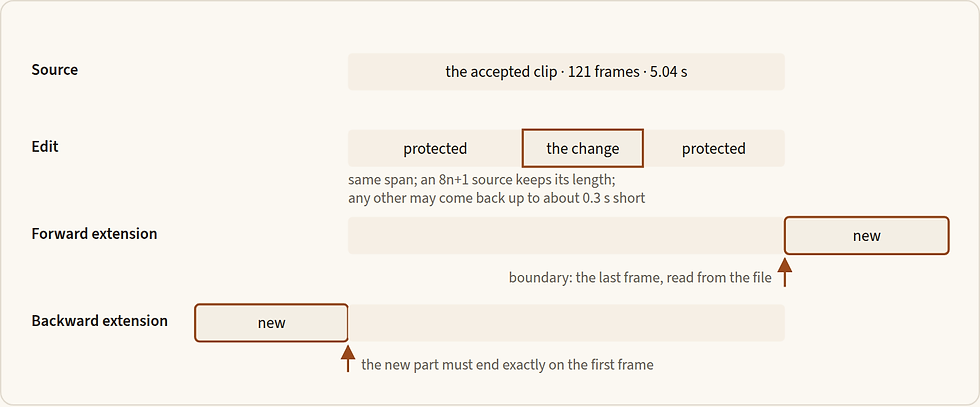
Figure 17.2 — An edit redraws the same span and protects everything outside the change; an extension adds time at one end, exactly on the accepted boundary.
Extending a clip forward or backward
An extension adds time at one end of an accepted clip. Forward continues from the last frame and backward comes before the first; Wan reads the two words the other way round (18.3). It does not re-perform what is there, so it cannot slow a line the model has already timed.
Read the boundary state from the file: pose, hands and props, setting, camera and its distance, light and the last sound (for a backward extension, from the first frame).
Restate it briefly, then add only the next beat. A ledger, not a recap, which invites the model to restart the action. The maker's own example opens with the length and then gives only new action: "Extend @Video 1 by 5 seconds. A bee flies in and lands on the flower."
Start the new part where the old one ends, or end it exactly where the old one begins. Nothing that appears later in a clip may appear early in its backward extension.
One extension is routine; a second is a warning.
Cut the seam where it hides: near a composition you can cut on, or on an occlusion, an impact or a sound. The volume may differ slightly at the join, less when the source is a Seedance 2.5 clip. The maker recommends MOV files for seamless joins; the connection returns MP4, so expect a small step.
Sound
The words decide whether there is music, ambience or speech. The maker documents a notation: () for music, <> for sound effects, {} for dialogue and 【】 for subtitles; for dialogue that is not Chinese, name the language before the line, as in Name says: {…}. Use one convention in a prompt, and never 【】, which asks for on-screen subtitles: editorial text is composited in post. Plain sentences serve for room sound; put an effect in <> when it is tied to a beat. Whether the connection passes the notation as documented is not yet known (17.10).
Set the sound every time. With speech: name what owns the room ("a ceiling fan, a distant street"), and write "No BGM" and "No other voices". With no speech: "No BGM; generate only environmental sounds and action sounds." With the sound off: say so in the settings and keep the closing line. A shot that speaks always has its sound on, since with it off a laid-in take drifts from the mouth.
The speaking route: a new performance
Each project decides at the start how a line is delivered (Chapter 22). On the exact-take contract this tool makes only the wordless plate, sound off, and Sync Lipsync 3 fits the recorded take (Chapter 24). The pass discards the plate's own sound and lays the take, so plate sound follows what has passed: Kling 3.0 on, Seedance 2.5 off, Wan 3.0 off (24.3). On the new-performance contract Seedance performs the line, by one of two routes.
English, with Seedance's own voice. On an English-language project the line can be generated directly with the chosen voice.
Choose the voice by sample or by description. Bind a short sample to the speaker with the maker's sentence, "Image 1 depicts the protagonist John and uses the voice timbre from Audio 1", or describe the voice in the shot as the maker does ("He replies in a deep voice: {…}"). A sample lends a voice, not words, so record it on a different sentence. The voice must be one you may use in a final (Chapter 34).
Write the line once, in the notation, with the language named: Dina says, in English, warmly and without selling: {…}. The maker's own dialogue prompts carry "Generate audio strictly according to the dialogue; do not add or remove any lines."; add it.
Time the business by order, not by the line's words. The maker warns that repeating dialogue words after a line, or attaching tone, expression or action to specific words, can trigger burned-in subtitles. Write "as she finishes the first sentence". For different deliveries in one line use the maker's form, "Character's line (emotion): content." Subtitles can be reduced, not eliminated.
Write the mouth: lips and jaw move with the spoken words and are still in the pauses and after the line. Sign the keyframe with the mouth ready: lips together, relaxed, just before the line, both lip corners visible, and any gesture the words trigger not yet made, since a frame that shows it finished will not repeat it.
Buy seconds for the line, its business and the hold. The model re-times a line: extra seconds buy a hold, not a slower line.
The returned audio becomes the timing truth. The cut and the captions follow the clip's own sound (Chapters 29 and 30). Listen to the file, not the sample.
Egyptian and Saudi dialogue is never typed for Seedance to speak. The take, from an actor or ElevenLabs, goes in as the audio reference bound to the speaker, and the model re-performs it. The audience hears the clip's new audio, so a native ear checks every word, dialect, stress and long vowel again. If a repaired word is lost, the project moves to the exact-take contract; a third wording is never the fix.
A director's name as a technique token
A house amendment allows a named director's technique in Seedance motion prompts only, strictly as the name of an editing or motion style: "Guy Ritchie speed-ramping", "Snyder impact slow-motion". A director's name stays banned as a visual-style adjective everywhere, banned in Nano Banana Pro stills, and banned on Kling. Every use stays subject to the discipline against cliché.
Reach for the plain term first. Speed ramp, dolly zoom and bullet time need no name. The token earns its place only when it names a rhythm the plain term does not carry.
Give the plain words beside it, what the picture does and when, so that you check the file against the words and not the name.
Place it in the pace, once in a clip, tied to a visible event for the change of speed to land on (Example 17.4).
17.4 Templates
Fill every slot of a finished-grade template, or delete it on purpose; a slot filled with a guess is worse than none.
Written for this book · template; not run · finished grade · Seedance 2.5, a clip from a start frame
Template — a clip from a start frame
[The event, in order; something visible moves at once.] [One camera instruction, declared: locked, or the one move with its pace and where it settles.] [What the world does around the subject: two or three small systems.] Keep [identity, wardrobe, light, framing] exactly as in the first frame. [Whole-second stamps if the shot has phases; the pace in pacing words.] The shot ends on [a composition you can cut on] and holds for [a beat]. [Sound: what owns the room, and any event tied to a beat.] [Up to three earned exclusions.] No BGM; generate only environmental sounds and action sounds. No overlaid text, subtitles, logos, or interface graphics.Written for this book · template; not run · finished grade · Seedance 2.5, references to video (add the Video line when the shot borrows from footage)
Template — references to video
Image 1 is [name]: take [face, hair, build] only; [name] must strictly match Image 1; take nothing of its [backdrop, light, pose]. Image 2 is [the product]: take its shape, proportions, colours and materials; [its label faces away / its lettering is not changed]. Image 3 is [the place]: take the room and its light; take nothing of its framing or its people. [Video 1 is …: take only its camera path / timing / where each person stands; take nothing of its person, room, light or sound.]
Exactly [one / two] people, each appearing once: [who is already in frame, where, facing which way]. [Shot size and camera height; locked, or the one move and where it settles.] [The action in order, with its end; whole-second stamps if it has phases.] [What the room does around them. The light of this place. Anyone or anything with no file, in full.] Keep [the named things the action could break]. The shot ends on [a composition you can cut on] and holds. [Sound.] [Up to three earned exclusions.] No BGM; generate only environmental sounds and action sounds. No overlaid text, subtitles, logos, or interface graphics.
Written for this book · template; not run · finished grade · Seedance 2.5, an English speaking shot with the model's own audio
Template — a speaking shot, new performance, English
Image 1 is the first frame, exactly as it is. Audio 1 is the chosen voice for [name]: take its timbre and manner only, not its words. [Name] speaks in that voice. The camera is [locked at her eye level]. [Business before the line, if any.] [Name] says, in English, [delivery in a few words]: {[the line]} [Business by order: "as she finishes the first sentence …", never a quotation of the line.] After the line [she] holds, mouth closed, [where the eyes rest], to the end. Lips and jaw move with the spoken words and are still in the pauses and after the line. Keep [identity, wardrobe, light, framing] exactly as in the first frame. Generate audio strictly according to the dialogue; do not add or remove any lines. <[room sound]> No BGM. No other voices. No overlaid text, subtitles, logos, or interface graphics.Written for this book · template; not run · finished grade · Seedance 2.5, an edit, and an extension
Template — an edit, and an extension
Edit video: in Video 1, change [what, where or who] from [A] to [B][, from [x] to [y] seconds]. [B in full, or: Image 1 supplies its [cut, material, colour]; take nothing of its person, pose or background.] [What the change inherits as it happens.] Remove every trace of [A]. Preserve [faces, hands, props, light, framing, camera path], the timing and the original audio. The clip ends on Video 1's original final composition. No overlaid text, subtitles, logos, or interface graphics.Extend Video 1 [forward / backward] by [n] seconds. [Forward: Continue from the last frame of Video 1: / Backward: Before the first frame of Video 1:] the same [person], [setting, framing and light]; [the boundary state: pose, hands, what is held, the camera, the last sound]. [The next beat only, with where it ends; backward, ending exactly on the first frame of Video 1.] [The composition it ends on, then the hold.] [Sound.] No BGM; generate only environmental sounds and action sounds. No overlaid text, subtitles, logos, or interface graphics.Written for this book · template; not run · test grade · Seedance 2.5, any operation, at 480p
Template — the test grade
[The manifest: Image 1 is …; take … only.] [Shot size; the camera locked.] [One action with its end.] [Sound.] No overlaid text, subtitles, logos, or interface graphics.The test grade proves that a route runs. It is never the model of a finished clip: rewrite at the finished grade before the run you keep.
17.5 Examples at the standard
Five finished-grade clips, one for each job this tool is chosen for. None has been run.
Written for this book · telecom and tech · Seedance 2.5, omni_reference , three image references in the order written, 6 s, 720p, 16:9, sound on · finished grade; not run
Example 17.2 — Yara steps out and tilts a handset to the skyline, composed from three anchors
Image 1 is Yara in the film's evening light: take her face, hair, build and the charcoal linen shirt only; Yara must strictly match Image 1; take nothing of its backdrop, light or pose. Image 2 is the handset: take its shape, proportions, colour and materials; its back panel is unbranded and stays unbranded, and its screen stays dark. Image 3 is the Zamalek balcony at blue hour: take the room, the rail and the skyline only; take nothing of its framing. Exactly one person, Yara, appears, and she appears once: already standing just inside the open balcony door, the handset in her right hand at her hip. A medium-wide shot from the terrace at chest height, the camera locked on a tripod. 0-2 s: she steps out to the rail at an unhurried walking pace. 2-4 s: she lifts the handset slowly to eye level and tilts it until the back panel catches the last of the sky. 4-6 s: she lowers it to her chest and holds, looking out at the city. Behind her a sheer curtain lifts once in the breeze and, window by window, lights come on across the skyline while the rail and the handset stay fixed. Cool blue-hour light from the open sky falls on her left cheek, warm lamp light from the room on the back of her hand. The shot ends on Yara at the rail, the handset against her chest with its back panel to camera, the skyline soft behind her, and holds. Distant traffic, a neighbour's shutter, the small sound of her steps on tile. No BGM; generate only environmental sounds and action sounds. No overlaid text, subtitles, logos, or interface graphics.Copy the manifest: each file has one job and one fence, and Yara is locked to Image 1 with a count, so no twin can arrive.
Copy the opening: a reference does not fix the frame, so the shot size, the camera height and who is already where are written; the woman, the handset and the balcony are bound and never re-described.
Copy the clean back panel and dark screen: brand and interface are composited in post from the client's artwork.
Written for this book · beauty and personal care · Seedance 2.5, omni_reference , the speaking keyframe as the start frame and an 8 s sample of a licensed English voice, reading a different sentence, as the audio reference, sound on, 6 s, 720p, 16:9 · English-language project, new-performance contract · finished grade; not run
Example 17.3 — a two-sentence line to camera, in the chosen English voice
Image 1 is the first frame, exactly as it is. Audio 1 is the chosen voice for Dina: take its timbre and manner only, not its words. Dina speaks in that voice. The camera is locked at her eye level. She draws one small breath and looks into the lens. Dina says, in English, warmly and without selling: {Nothing to cover.} As she finishes the first sentence her fingertips settle against her cheek, and she goes on: {Just looked after.} After the line she smiles slightly, mouth closed, and holds to the end, her eyes on the lens. Her lips and jaw move with the spoken words and are completely still in the pauses and after the line. Keep her identity, wardrobe, lighting and framing exactly as in the first frame. Generate audio strictly according to the dialogue; do not add or remove any lines. <soft room tone with a distant street, the faint brush of her fingertips on skin> No BGM. No other voices. No overlaid text, subtitles, logos, or interface graphics.Copy the split of jobs: the frame carries her, the room and the light; the sample the voice; the words the language, the delivery, the business and the mouth.
Copy the business timed by order: "as she finishes the first sentence" never repeats the words, which keeps the subtitles away.
Copy the frame and the seconds: lips together, her hand not yet at her cheek; a breath, about 2.5 seconds of line and a hold. The returned audio times the cut.
Written for this book · food and drink · Seedance 2.5, omni_reference , the signed start frame, 5 s, 720p, 16:9, sound on · a technique token under the house amendment; finished grade; not run
Example 17.4 — a lime squeezed over iced hibiscus tea, with a speed ramp
The hand closes on the lime half, squeezes, and the first drop of juice falls into the glass of iced hibiscus tea. The camera is locked at the rim of the glass in a low, close shot. Guy Ritchie speed-ramping: real speed while the fingers close, then a sudden drop into slow motion as the drop leaves the lime, so that the fall, the dimple it makes on the surface and the ring that spreads through the ruby tea are seen in a crawl; then a snap back to real speed as the ring reaches the glass wall. 0-1 s: real speed, the fingers close and the lime gives. 1-3 s: slow motion, the drop, the dimple, the ring. 3-4 s: real speed, the lime lifts away and the ice settles with one small turn. 4-5 s: the hand gone, the glass alone. Keep the glass, the tea, the ice, the lime, the light and the framing exactly as in the first frame; the condensation on the glass stays where it is. The shot ends on the glass alone, the last ring fading, and holds. The wet squeeze, one clear drop as the slow motion begins, the ice clinking as it settles. No BGM; generate only environmental sounds and action sounds. No overlaid text, subtitles, logos, or interface graphics.Copy the token's place: in the pace, once, naming a rhythm and never a look, with the plain words beside it, so the file is checked against what happens and when.
Copy the landing: the change of speed is tied to a visible event, the drop leaving the lime.
Copy what is left out: the frame carries the glass, tea, lime and light, so none is described again.
Written for this book · automotive and luxury · Seedance 2.5, video_edit , one accepted Seedance clip (121 frames, 5.04 s, 720p) and one paint swatch, sound as the source · finished grade; not run
Example 17.5 — the accepted drive-by, in forest green instead of silver
Edit video: in Video 1, change the paint of the saloon from silver to deep forest green for the whole clip. Image 1 is the paint swatch: take the green and its pearl depth only; take nothing of its shape, background or lighting. Remove every trace of the silver: the bonnet, the doors, the roof, the bumpers and the mirror caps all become the green, while the chrome, the glass, the tyres, the badge and the number plates stay as they are. The new paint takes the same reflections as the old: the sky along the bonnet, the palm fronds sliding over the roof, the same highlights at the same moments, with the pearl catching the low sun as the car passes the camera. Preserve the car's shape and path, the camera path and framing, the road, the palms and the other traffic, the light, the timing and the original audio. The clip ends on Video 1's original final composition. No overlaid text, subtitles, logos, or interface graphics.Copy the order: the task sentence, the change from A to B with its scope, then the swatch with one job and one fence.
Copy what is written in full: an edit creates pixels, so the pearl depth and the way the new paint takes the old reflections are described; the swatch is only bound.
Copy the protected list: it names the badge, the glass and the original audio, and ends on the source's last composition. The real badge goes on in post.
Copy the source: 121 frames is 8n+1, so the result keeps its length.
Written for this book · automotive and luxury · Seedance 2.5, video_extension , backward, 4 s (the shortest the connection allows), the accepted clip as the source; the price checked first · finished grade; not run
Example 17.6 — a watchmaker's breath before the line, four seconds backward, two kept
Extend Video 1 backward by 4 seconds. Before the first frame of Video 1: the same watchmaker on the same stool at the same bench, in the same framing and warm bench light, the camera locked exactly as in Video 1. Her loupe is pushed up on her forehead, the tweezers rest on the mat beside the open watch, her mouth is closed. She looks down at the movement, draws one slow breath and lowers the loupe into place; the extension ends exactly on the first frame of Video 1, loupe down, tweezers in her right hand, held for that last moment. Nothing that Video 1 shows later appears here. No speech. The bench lamp's faint hum and the tick of the open watch. No BGM; generate only environmental sounds and action sounds. No overlaid text, subtitles, logos, or interface graphics.Copy the boundary: the state at the join is the end of the new part, which ends exactly on Video 1's first frame.
Copy the fences: "Nothing that Video 1 shows later appears here" and "No speech", so the line is not spoken early. Ask for four seconds, keep the last two.
17.6 Settings
The connection's contract was read on 28 Sep 2026; the maker's limits on 30 Sep 2026.
Setting | Values | Use |
Model | seedance_2_5 | name it in every request |
Mode | t2v (default) · omni_reference · video_edit · video_extension | omni_reference whenever anything is attached, a start frame included. The job history does not store the mode, so write it in the run record |
Duration | 4 to 30 s; default 5 | fit the beats: the line, its business and a beat of hold; 5 to 6 s for most clips. An edit ignores it and bills the source's length; an extension runs 4 to 30 s, so ask for four or more and trim in the cut |
Resolution | 480p · 720p · 1080p; default 720p | 480p to prove a route, never to judge lips; 720p to judge and usually to keep; 1080p only when the delivery needs it |
Aspect | auto · 21:9 · 16:9 · 4:3 · 1:1 · 3:4 · 9:16; none stated | set it every time. A start frame sets it; an edit and an extension follow the source. Only 16:9 has been run on the connection |
Sound | on · off; default on | on for speech and room sound you keep; off for a wordless plate (24.3). The same price either way |
Bitrate | standard · high | standard; what high does to the picture is not known |
Variants | 1 to 4 | one for a proven prompt; each is charged |
Extension direction | forward · backward | required for an extension, refused elsewhere |
Not offered | a seed, a negative-prompt field, a frame rate, MOV output, a mask, the preview mode, a task-type field, the last frame returned | fence in words; take a last frame from the file |
Defaults that bite. The default mode is t2v, so set the mode every time. The default sound is on, so a plate for Sync Lipsync 3 is switched off (24.3). Aspect has no default.
What comes back. A 720p job returns 1280 × 720 at 24 fps, and a 5 s request returns 121 frames, which is 5.04 s (6 s returns 6.04 s); a 480p job returns 854 × 480. With the sound on the file carries AAC at 32 kHz in stereo; with it off there is no audio stream. The holds after the action are the only handles.
On the maker's own service there is more: a preview mode (a 480p preview, then the final), the last frame returned, a seed, MOV output for edit and extension, which holds colour better, and a task-type field. Its rate limit is 3 simultaneous tasks for an individual account, 10 for an enterprise; a result link lasts 24 hours. On the connection, jobs were refused above about three at once on 12 Sep, and a batch of four ran clean on 27 Sep.
17.7 Checks before you sign
On the returned file
Probe it: raster, frame rate, length, audio stream (Chapter 30).
The opening: everyone who should be there already is, the people counted match the cast, and no one and nothing is duplicated.
Faces at 200 % against the master or the in-look anchor; the costume; the product's shape and marks.
Leaks: no reference's backdrop, light or grade; no sheet panels or grey ground; no fingerprint-like pattern in grass, foliage or fabric.
The move, at the start, the middle and the end: one dominant camera action, real parallax, the subject's height first against last.
The ending: a composition you can cut on, then a live hold.
Hands, closures, labels and lettering at 100 % and 200 %; lettering is replaced in post from the real artwork. No subtitles, captions, logo or interface.
Sound by ear: what owns the room, no music if excluded, no other voices, no step at a join.
A speaking shot, heard word by word: the mouth moves with the words and is still in the pauses. Note the second the line landed and the length of the hold.
An edit: the length against the source; everything outside the scope, frame by frame; colour and brightness against the original. Keep the original beside it, never over it.
An extension: the join at normal speed and frame by frame: pose or prop, a restarted action, a step in the volume, inherited subtitles.
Write the verdict in the shot record with the mode, the inputs in upload order, the prompt as sent, the job number and the price (Chapters 8 and 33). Acceptance is the director's, in the cut (Chapter 29).
17.8 Failures and fixes
You see | Why | Smallest fix |
A twin, or an extra person | a picture with several faces, or near-duplicate references | separate clean files; the count and the one-instance line |
One character takes another's face or voice | the upload order does not match the numbers | re-attach in order of first appearance and renumber |
A reference's backdrop, light or grade leaks in; sheet panels or grey ground appear | no fence | "take nothing of …"; crop the file to its job; "do not show the sheet, its panels or its backdrop" |
Wider framing than asked, or the shot opens empty | a reference does not lock the frame | write the shot size, camera height and who is in frame at the start |
Fingerprint-like texture in grass, foliage or fabric | a high-resolution AI-made reference | resize the reference to no larger than the output |
Glowing eyes | strong emotion words | calmer words; "normal human eyes; no glowing eyes" as the top-priority negative |
Lettering misspelt | text generated in the frame | composite it in post; the maker's fix is separate letters, or the text supplied as an image |
Subtitles appear | dialogue repeated in the prompt, business tied to words, or subtitles in a reference | say the line once, time the business by order, use "Character's line (emotion): content"; clean references |
Music under "No BGM" | a sound effect turned into a score | an audio policy at the head and the tail listing the music terms (BGM, score, instrumental, melody, synth effects, ambient pad); or strip it in the mix |
An edit comes back a new shot, or spreads, or half applies | no task word, the wrong mode, a loose scope, or two changes in one job | "Edit video:" first, the mode set, when and where, one change, the protected list; after two that spread, composite in post |
An edit is a few frames short | the source is not 8n+1 frames | trim the source; or use a reference job with a set duration |
A complex job is unstable, or a changed aspect fills with invention | a reference task and an edit in one prompt; an edit cannot change the canvas | a reference pass, then an edit pass; for an aspect change, a reference job with a frame-by-frame plot description |
An extension restarts the action, jumps at the join or steps in volume | a recap; the boundary state not matched; the maker's volume shift | open on the boundary state with no recap; trim at the join; cut on a sound; even the level in the mix |
The mouth does not follow; the line starts at once; a long hold after it | the sound is off; nothing is written before the line; the model re-timed the line | sound on; write the business first, or extend backward; trim the hold and buy fewer seconds next time |
A rejected upload (a 400 error) | a JPG with unusual chroma subsampling | convert with ffmpeg, or use PNG |
The retry ladder, smallest lever first. Read the file against the prompt: did it do the operation you chose (Chapter 13)? Then fix the input: the order, a crop, a fence. Then one sentence of the words. Then a lower demand: fewer people, one camera action, a shorter shot. Two failed retries mean the fix is upstream: rebuild the anchor, make the frame and use the start frame, or composite in post. Never a third wording of the same prompt.
17.9 Limits, prices and rights
The maker's limits (checked 30 Sep 2026; the connection states none of its own).
What | Limit |
One generation | 4 to 30 s, or -1 |
Assets in one job | 50: 30 images, 10 videos, 10 audios |
Images | 300 to 6000 px a side, ratio 0.4 to 2.5, under 30 MB each |
Videos | 2 to 30 s each, 30 s in all; 24 to 60 fps; up to 200 MB each; MP4 or MOV; an edit source 4 to 30 s |
Audio | WAV or MP3; 2 to 30 s each, 30 s in all; up to 15 MB each |
Output | 480p and 720p (8-bit); 1080p (10-bit HEVC, which some players cannot open) |
Prices. A credit is about five US cents (Higgsfield's planning figure, Aug 2026). On the connection:
Job | Credits | When |
5 s, 720p, sound on or off | 35 | charged 20 and 26 to 27 Sep |
6 s, 720p | 42 | charged 20 Sep |
5 s, 480p, one picture attached | 15 | charged 27 Sep |
5 s, 1080p | 45 to 60 | quoted 11 and 20 Sep |
Edit, extension, video input, audio only | not known | never priced |
The rate is 7 credits a second at 720p; it moved from 6.5 between 17 and 20 Sep. Mode, sound and bitrate have not moved the price; resolution and duration have. At the maker a 5 s clip at 16:9 costs USD 0.514 at 480p, 1.156 at 720p and 2.843 at 1080p; with video input the same five seconds cost 0.553 to 2.152 at 480p, 1.244 to 4.838 at 720p and 3.062 to 11.907 at 1080p, the low end for 2 to 4 s of input and the high end for 30 s (BytePlus pricing, updated 28 Sep 2026). The maker bills only successful videos. Before every paid run, ask the platform for the exact price at no cost, especially with a clip attached (Chapter 34).
Rights and terms.
Higgsfield's terms on outputs, on training from uploads and on what stays off the platform (read 30 Sep 2026) are in 34.5 and 34.6.
Real faces. The maker's service refuses uploaded images and clips with real human faces, and offers reuse of its own trusted outputs, preset digital characters and authorised real-person assets. The connection accepted generated faces; a real actor's photograph is untested (Chapter 34).
BytePlus's acceptable use policy (read 30 Sep 2026) forbids removing the marks or metadata that show content is AI-generated, and depicting a person's voice or likeness without consent. Higgsfield's terms bind you to each provider's policy.
What may ship. An accepted clip may ship, through Chapter 8's four gates: LOCK, SPEND, RIGHTS and ACCEPT.
17.10 Version notes
Current. Seedance 2.5, dreamina-seedance-2-5-260628, announced 31 Jul 2026; the prompt guide and tutorial both updated 28 Sep 2026 (checked 30 Sep 2026). Nothing later is announced.
What the maker lists for this version. Up to 50 assets in one job; an audio reference that can stand alone; an edit that keeps the source's aspect ratio and length; integer-second timestamps; multi-view images for up to five subjects.
Re-check when the next version ships. The model identifier and the guide's date; the asset counts and clip lengths; whether whole-second stamps and the sound notation are unchanged; which maker-only controls reach the connection; the credit rate a second; the real-face policy; the shortest extension.
Not yet known
Whether the connection keeps your upload order as the Image numbers, and how a start frame and image references share numbers. Until it is known, name every file in words. One 480p job with two images in swapped order settles it.
Whether the connection passes whole-second stamps and the sound notation, or speaks or prints the braces. Try one 480p job before a shot depends on either.
How closely a generated English voice follows a sample. Run one 480p job with the actual sample and listen before a client shot depends on it.
What an edit and an extension cost on the connection, whether the mode alone pins the task, whether an extension returns the new part or the whole clip, and whether the source's sound is kept. One cheap job each, after a free price check.
A real actor's photograph as a reference. The maker refuses real faces; the connection accepted generated ones. Plan real actors as unproven.
What to remember
On a reference job the words bind, place, lock and protect, in that order, and describe only what no file carries.
A reference passes everything in it: give every file one job and a fence, and number by first appearance.
The task is named in the prompt and the mode must agree: reference, edit or extension.
An edit changes one thing, protects the rest by name (the sound included), and starts from a source of 8n+1 frames.
An extension restates the boundary state briefly and adds only the next beat; once is routine.
Time is whole seconds and pacing words. Sound is set every time: on for a line Seedance performs, off for a plate for Sync Lipsync 3.
English dialogue may come from the model's own voice; Egyptian and Saudi dialogue never does.
A director's name is a technique token in a motion prompt only, with the plain words beside it.
Next: Chapter 18 · Wan 3.0


Comments