
Chapter 14 · The moving shot

Part 3 · Motion
A moving shot is a signed picture, a paragraph of words and a set of settings, each owning its own part of the job. This chapter teaches the paragraph and what surrounds it: what the frame already carries, the seven things a finished prompt says and in what order, how to size a camera move before you ask for it and measure it after, where the shot lands, how two frames pin a travel, the devices, turns and actions that recur in commercials, how to hold scale and continuity, and how to set, probe and check the file. It is written for every tool; each tool's dialect is in its own section (Chapters 16 to 19).
In this chapter
Who owns what: the start frame, the words and the settings
The start frame: state 0 and room for the move
The seven elements of a finished prompt, each with its purpose
Sizing a camera move from geometry, and measuring it on the returned clip
The endpoint, and start and end frames
Camera devices, product moves, turns and action beats; reverse motion and the composite repair
Scale and continuity: wides, crowds, text under a move, the bible
Format, length, resolution, handles and probing
Checking a moving shot, the retry ladder, and when to stop
Before you start. Chapter 5 teaches camera language, Chapter 9 makes the keyframe, Chapter 10 the anchors, and Chapter 13 chooses the route; this chapter assumes a start frame unless it says otherwise. Chapter 15 teaches performance.
14.1 Who owns what
A shot made from a signed still divides the work three ways. The start frame is the set, dressed and lit, with the people and the product in their first positions. The words are the direction. The settings are the camera body and the stock.
Let the frame own appearance and the words own change. The words describe the camera, the action, the world's life, what must not change, the ending and the pace. They describe appearance again only when the call makes or edits pixels: text to video, references, edits (Chapter 13).

Figure 14.1 — The division of labour in a shot made from a start frame. Where the words describe what the frame already shows, the frame tends to win but is not guaranteed to; where they describe change, they are the only authority.
All three makers say the same of the frame. Kling's image-to-video guide (24 Nov 2025): "Image-to-Video is already provided with a scene. Thus, it only requires the depiction of the subjects in the image and the intended movement for these subjects." The Seedance 2.5 prompt guide (page dated 28 Sep 2026): "When the reference asset itself is sufficiently accurate, simply state that it should be referenced and avoid repeatedly describing the scene in detail." The Wan 3.0 prompt guide (page last modified 28 Sep 2026): "The image already establishes the subject, scene, and style, so the prompt should focus on describing the motion, plot, dialogue, and camera movement."
Describing the frame again is not harmless redundancy. It can invite the model to re-render what should be protected, and it spends attention on the wrong layer. The start frame is also a strong reference, not a pixel lock: the engine may re-render a prop or reopen the framing. That is why the words protect by name, and why you compare the first frame of every clip with your keyframe.
Do not lean on the frame to correct your words. Where a description and the frame disagree, the frame usually wins, so a wrong list of what is in the frame is a risk, not a lever. Describe the frame truly, or protect it without describing it.
Separate what holds from what changes, and say when it changes. Identity, the product's shape and the room hold for the whole shot; a state changes at a stated beat ("from the moment she hangs it, the jacket is off").
The settings are never prose. Model and mode, the start and end frame slots, resolution, duration and the sound switch are chosen in the interface, and the aspect is the keyframe's. Writing "vertical" or "10 seconds" into a prompt sets nothing (14.15).
14.2 How the anchor enters a clip
The anchor is the signed picture of a person or a place (Chapter 10). It reaches a video model by one of two routes, and the words differ on each. Never use both in one shot (13.4).
Route 1: through the keyframe. The anchor stays behind the still. Make the keyframe from it (Chapters 9 and 10), sign it at the instant the clip begins in (14.3) and put that one picture in the start-frame slot. The words do not describe the keyframe: no face, no clothes, no room, no light. They say what moves and, after the action, what must not change, by name: "Keep her face, the bottle's label and the ring on her right hand exactly as they are." Where a tool takes no references (Kling on the connection, read 28 Sep 2026), the keyframe alone carries the face.
Route 2: through references. There is no keyframe. The anchor itself is attached and the model composes the frame, so the words do four jobs in this order: bind, place, lock and protect (13.4). Describe in full only what no file carries. Each tool binds in its own syntax (N.3 in Chapters 17 and 18).
A reference call makes pixels, so it is written like a text-to-video call with the files standing in for the descriptions. A keyframe call makes none, so it is written like a direction. That difference is why the two routes do not mix.
14.3 The start frame: state 0, and room for the move
Sign the start frame at the state the clip begins in, never at its end. The model will not perform a move the first frame already shows finished. Chapter 9 (9.4) teaches how to write that instant into a still; this section is what the clip does with it.
The frame is frozen early in the action, about 20 to 40 per cent of the way in, so that the destination is still open and the momentum undeniable. It carries directional evidence for each system that will move, written as positions ("rear foot just released, grit hanging in the air"), never as an open verb and never as a contact the body could not hold. It leaves room for the move: the feet and the ground if the walk's contact matters, the destination already visible, space on the side the camera will go. Words cannot rescue a still that crops these out. If nothing in the shot moves, the still is declared static and the words give all the motion to the world.
A frozen system in the still is a motion the clip owes. The still's shot record briefs the motion prompt: whatever it says is frozen, the clip must complete. A record that reads "steam mid-rise, a pour mid-stream, a beacon mid-rotation" obliges the prompt to spend all three; a record that promises a system the still gave no phase leaves the prompt asking for a motion the frame has not begun. Write into the still what the record promises.
The state-0 failure. A keyframe that shows the result leaves the clip nothing to do. A pour signed with the glass already full gives a clip with no pour (Figure 14.2). The fix is a one-change edit of the still (Chapter 10) back to the shot's first instant, which costs a fraction of another clip. If the first second of a clip looks like a photograph waking, freeze later next time; if the clip has nothing left to do, freeze earlier.

Figure 14.2 — A keyframe that shows the result gives the clip nothing to do. The same frame, edited back to the moment before, gives the move somewhere to start.
Keep a still a still. No motion verbs that leave the phase open, and no narrative time ("as", "then", "begins to") in a keyframe prompt.
Make the frame where the move is possible. For any prop that changes hands, the frame shows that the move can happen: a free receiving hand, a reachable object, a clear path. For a transfer of weight, sign the frame before contact and say who carries the weight. Make the frame at the delivery aspect (14.15). Chapter 9 (9.10) covers the complete-shot start frame, the speaking frame with its mouth state, and the contact state.
When the detail will not come through after two attempts, paint over the still before you write the prompt: sign the painted still with its parent recorded, protect the detail by name, and re-judge the performance on the clip (other directors report this).
14.4 The seven elements, in order
The finished grade is one flowing paragraph with seven jobs to do. The order is functional: the first sentence fixes what the shot is about, the world and the protection follow, and the last sentences say where the clip lands. It is craft, built on the skeleton the makers' own formulas share (subject, action, scene, camera) and on the Mastorna trailer's Kling prompts (35.7); it is not a maker's rule.

Figure 14.3 — The seven elements of a finished-grade motion prompt, in order. The sixth is not a sentence of its own: pace and phasing are woven into the first two. The seventh closes every finished-grade prompt: earned exclusions (three or fewer; five is the ceiling), then the model's own line for subtitles and sound.
1. The declaration. The camera move with its rig, direction, destination and pace; or "The camera is locked." with all the motion given to the world. It fixes the shot's one intention: one dominant camera action per phase. A fast repositioning names where it lands.
Two rules keep the declaration honest. First, name the rig, never the hedge. Hedge-state descriptions ("barely perceptible", "largely still", "mostly motionless", "imperceptibly") are banned as defaults, because they ask for a camera that is neither moving nor still. A genuinely fixed camera is legal, and often right, when it is declared as design: name the fixed frame and assign all the motion to the world. The makers agree. Kling's own example says "The camera remains fixed on the word 'KLING'", Wan lists "Fixed shot, camera static, position unchanged", and Seedance's examples say "locked-off camera". Second, something visible moves at once. A look, a breath or a settle counts. The literal words "from frame one" stay out of the prompt, because the phrase itself misbehaves. A stillness written for longer than about a second is a design choice; Seedance's maker documents relative time for it ("After 3 seconds, everyone around him shakes their head").
The first sentence carries what the shot is about. When the camera move is the shot, open on the camera with its rig and destination. When the shot is an action or a performance, open on who does what and declare the camera in the next sentence. Seedance's formula puts the subject and the event first, with one camera instruction after them. No maker's formula puts the camera first, and no Kling page could be found saying that its first words weigh most, so the order is a craft rule. The formulas differ, and each tool section (N.3) gives its own order:
Maker, page | Its own formula | Puts first |
Kling, image-to-video guide (24 Nov 2025) | "Prompt = Subject + Movement, Background + Movement" | the subject |
Kling, motion-prompt article (3 Jul 2026) | "Subject + Primary Action + Environmental Motion + Camera Motion" | the subject |
Seedance 2.5, prompt guide (28 Sep 2026) | "Subject + Location + Event + Genre/Style + Camera movement..." | subject and event |
Wan 3.0, prompt guide (28 Sep 2026) | "[Shot N (start-end seconds): Subject + Scene + Motion + Aesthetic control]", after an overall description; write "One continuous shot" first for a single shot | an overall line |
2. The primary action. One committed action carried through time, with a beginning, a middle and an arrival, and at most two secondary actions. Write physics and contact, not captions: not "she runs fast" but what her body does through the seconds. Write feeling as visible cues, never as an emotion label; Seedance's maker advises replacing intense emotional language such as "fanatical" with neutral wording, to reduce the chance of glowing eyes (Chapter 15).
3. The world's life. Cloth, steam, dust, crowd, water, light: the world moves even when the camera hardly does, and a clip whose only motion is the subject reads as a diorama. Build the life only from systems the frame already contains. A ceiling fan can lift a newspaper corner; never invent a breeze in a closed kitchen. Never name something that is off frame, because a named thing may be given a body: a laptop screen "beside the camera" can become a laptop lid rising into the shot. Describe its light instead ("the cool grey light comes back onto his near cheek").
4. Protection by name, after the action. What the motion could break: faces, hand anatomy, prop geometry, sign letterforms, background softness, the period of the vehicles and the dress. Say it positively: "Keep her face exact and the spike-to-track contact true under load." Protection follows the action so that the last thing the model reads is what must survive it. Name a subject only to say what it does; never rebuild its clothing or its room.
5. The endpoint. The composition the clip lands on, then a hold (14.7).
6. Pace and phasing. Woven into the first two elements: an approximate magnitude, a duration and a speed profile where the tool takes them; pacing words and whole-second stamps where it does not (14.5).
7. Earned exclusions, and the hygiene line. Five is the ceiling for any prompt (2.7); on a clip, work to three or fewer, each aimed at a failure you expect in this clip, then the model's own line for subtitles and sound. Wan's guide says "Do not pad the list or repeat content already stated in the positive prompt." Seedance's guide supports negatives for subtitles and audio by name ("No subtitles"; "No BGM; generate only environmental sounds and action sounds"); say everything else in positives.
A finished-grade prompt always closes on the hygiene line, on every tool. What the line says depends on the sound switch. With the switch off, which is how a silent clip is made, the line is the text half alone: "No captions, no subtitles, no on-screen text." The switch carries the sound half: on Kling and Seedance a sound-off file came back with no audio stream (probes of 12 to 26 Sep 2026), and words about sound beside an off switch add nothing. With the switch on, the line adds the sound half in the tool's own words. Where a sign or other lettering in the frame must survive the move, close instead on "no overlaid text, subtitles, logos, or interface graphics"; it bans the overlay layer and leaves the world's own text alone.
Set the sound explicitly every time. The tools generate sound unless told otherwise (the platform contract, 21 to 28 Sep 2026; Alibaba's API reference, 28 Sep 2026), and Wan's guide says that without "No dialogue" the model decides on its own. With the switch off the file carries no sound and the switch is the whole instruction; with it on, write the sound line the tool reads. The edit owns the final sound (Chapters 21 and 25). The exception is a speaking shot whose generated dialogue the director accepted on the clip (Chapter 22).
Length is decided by completeness, not by a count. No maker gives a word range. Kling's text-to-video guide says a subject's movement should be "straightforward and suitable for a 5-second video"; Seedance warns that too little plot in a time range invites improvisation and too much invites "excessive cuts". As a drafting expectation only, a Kling motion call runs about 120 to 220 words and a Seedance call about 55 to 130, longer when it carries several timed beats and a written sound line (Example 14.2); either shortens when the frame already carries the truth. Each element is present when it carries an obligation, nothing contradicts, nothing decorates.
Written for this book · automotive and luxury · Kling 3.0, start frame (the signed dusk frame of a parked saloon), 5 s, std, 16:9, sound off · finished grade · not run
Example 14.1 — a camera-led push onto a parked car
Push in on a heavy studio dolly toward the front three-quarter of the parked saloon, advancing approximately forty centimeters over five seconds, a settling push that eases to rest, the dolly's rolling weight reading as a slight lag at the start and a firm, damped arrival at the end. The rain that has just stopped sheds from the roof edge in single drops and runs down the bonnet in slow beads; the hazard lights pulse amber on the wet asphalt and the reflection of each pulse slides across the paint; a string of far harbour lights flickers behind. The grille bars, the badge and the wheel spokes keep their exact shapes and spacing as the camera advances, and the reflections stay attached to the bodywork. The push settles with the badge at the centre of the frame and one bead of water hanging at the edge of the bonnet, held to the end. No overlaid text, subtitles, logos, or interface graphics.The frame carries the car, the road, the dusk and the light, and none of it is described. The words name only what moves and what must survive.
One rig with one mechanism opens the prompt, and one approximate magnitude comes with its duration and a speed profile that ends.
The world's life is four systems the frame contains (drops, beads, the pulsing reflection, the far lights).
Protection follows the action, and the endpoint is a composition with a hold. The closing line is the overlay exclusion because the badge is lettering in the frame.
The test grade
The test grade keeps the essentials: the move, the action, the end and a hold, one protection line and the hygiene line. Drop the world's life beyond one system, the record, and the rig sentence unless the shot is a move. Never drop the endpoint or the sound setting. Use it to prove cheaply that a still moves and that a route holds the frame; it is never the model of a clip you will deliver.
Template: the test grade, any tool (written for this book; not run)
[Who or what moves, and the one thing it does, with its stop.] The camera is locked. [What must not change, by name.] The shot ends on [the composition], held to the end. No captions, no subtitles, no on-screen text.The shot record beside the prompt
The prompt stays pure: duration, model and tier are settings. Beside it goes the shot record (Chapter 8), which the model cannot read and the edit and the retry depend on. A clip from a start frame needs these lines before its first generation.
Field | What goes in it |
Input | the approved still, by name and version: the clip's parent |
Parameters | tool, mode and duration, as set in the settings |
Motion continuity | the previous shot's exit state, and what the next shot needs |
Environmental motion | the systems the frame contains that the clip will move |
Protected elements | faces, props, text, geometry, period: the list the prompt names |
Endpoint spec | the resting composition, cuttable |
Watch | two or three risks for this clip: where to look frame by frame |
Revision lever | the first adjustment if the take fails, chosen before the first attempt |
Mid-action status | copied from the still's shot record: the motion the clip owes |
14.5 Measured moves: sizing one, and measuring it
A slow move whose size matters is measured. What the tool does with the number differs, so the rule comes first and the dialect after.
On Kling, one approximate magnitude per moving system. Write one distance or one angle, prefixed "approximately", with the duration and a speed profile that ends, and the visible result beside it: "advancing approximately fifteen centimeters over five seconds, a settling forward motion". Timed phase segments ("0–1 s: … / 1–4 s: …") may be added for a phased move. Three things stay out: stacked simultaneous metrics on one move (a distance, an angle and a speed together), coordinate-style precision, and contradictory spatial demands, which are the documented trigger for warping. A distance with no duration leaves the speed to the model, and a number with no visible result is a guess about what the model will do with it. Bold or fast moves stay in words: "whip pan from the older man to the younger man". No lens numbers and no camera-body numbers belong in a motion prompt. The Mastorna trailer's Kling prompts use it (35.7). Kling's own pages use numbers freely: the 3.0 guide (6 Feb 2026) writes "The camera orbits the protagonist in a smooth 360-degree pan" and "At the 4th second, the camera accelerates forward with her", and the maker's motion-prompt article (3 Jul 2026) advises "Use duration and pacing descriptions that are visible in the scene."
On Seedance and Wan, pacing words and ordered beats. Seedance 2.5's guide lists three forms of time stamp: clear intervals ("0-3 seconds...3-7 seconds..."), a time point ("Quick left sideways transition at the 5-second mark") and relative time ("After 3 seconds, everyone around him shakes their head."). It sets "1-second intervals as the basic unit", warns against gaps such as "0-3s... 5-6s...", and says stamps should not control high-frequency actions such as "shake your head three times per second". The same guide records that Seedance 2.0 did not respond to timestamps and that 2.5 supports integer-second stamps; that is the maker's account, so a stamp is a route check on your connection. Wan's guide gives its shots as segments of 2 to 5 seconds. A magnitude on either tool is a repair, for a slow move that overshoots ("a gentle advance of about a hand's width in total").
Choose the size from the subject's distance
A push is camera geometry before it is a prompt. With the lens unchanged, a camera that travels a distance d straight toward a subject at distance D enlarges the subject's image by
E = D ÷ (D − d)
Measure D from the lens to the part of the subject you frame on (the face, the label). A pull back is the same calculation with D ÷ (D + d): 15 centimetres away from a subject at 1 metre gives × 0.87. Turned round, the travel that a wanted enlargement needs is d = D × (E − 1) ÷ E.

Figure 14.4 — Push geometry seen from above. The camera travels d toward a subject at distance D; the subject's image grows by D ÷ (D − d). The far wall is much farther than the subject, so it grows much less: that difference is parallax, and it is what separates a dolly from a zoom.
The table gives the enlargement for the sizes finished prompts use, and beside it the height that a subject filling one third of the frame's height would then fill.
The push | Subject 1 m from the lens | Subject 2 m away | Subject 4 m away |
15 cm | × 1.18 · 39 % | × 1.08 · 36 % | × 1.04 · 35 % |
30 cm | × 1.43 · 48 % | × 1.18 · 39 % | × 1.08 · 36 % |
60 cm | × 2.50 · 83 % | × 1.43 · 48 % | × 1.18 · 39 % |
The same 15 centimetres is a strong move at 1 metre and a small one at 4, so a distance in a prompt is half a specification: choose the subject's distance too, and write it in the shot record. A generated still has no tape measure. D is the distance you decide the still implies, written once and used for every measurement of its clips. On a 720-pixel-high frame, one third is 240 pixels: a push of 15 cm at 4 m grows it by 9 pixels, and 60 cm at 1 m grows it by 360, to 600 pixels or 83 % of the frame. Things farther from the lens grow less, which is what makes a push a dolly move and not a zoom; a zoom enlarges everything by one factor.
Measure what the model did
A measured move is a request, and the returned clip is the answer.
Measuring a push on the returned clip
Take the first frame and the last frame at the size the file returns, exported from your edit or with ffmpeg (a free command-line tool, from the same project as ffprobe).
Pick one rigid feature at the subject's distance that does not move in the clip: a chair back, a door frame, the height of the product, the table's edge. Never use anything that leans, turns or is carried toward the camera. Measure its height in pixels in each frame: h0 and h1.
Work out the travel. The enlargement is E = h1 ÷ h0, and the travel it implies is d = D × (E − 1) ÷ E, where D is the distance written in the shot record. A chair back that measures 240 pixels in frame 0 and 262 in the last frame gives E = 1.092; with D = 2 m, d = 2 m × 0.092 ÷ 1.092, which is 0.17 m.
Check that it was a move. Measure a second feature well behind the subject in the same two frames. On a push the near feature grows more than the far one; if both grew by the same factor, the model zoomed, and the rig sentence needs its weight or its mechanism (14.6).
Record the pair: the travel asked and the travel measured, in the run record.
A pixel or two of error on 240 pixels is about 1 per cent, so an enlargement of × 1.04 is at the edge of what this method can read. Measure on the file you will judge: Kling's maker documents 720p and 1080p, and the raster a file returns differs from its label (14.15).
Whether Kling honours a stated distance, and how closely, is not yet known; the method above answers it clip by clip. Kling's own app can set the extent of a camera move by "displacement parameters" (the maker's camera-control guide, 24 Nov 2025, read 29 Sep 2026), an app control that is not prompt text; the connection exposes no camera values. Kling 4.0 was announced on 28 Sep 2026 and is covered in Chapter 16; measure its first clips the same way.
14.6 Rig physics: give the move a body
Float, the weightless, digitally smooth drift that announces AI, is defeated by mechanism language. The camera move is given a body ("the rolling weight of a dolly on boards", "the micro-vibration of a heavy rig", "absorbed by the crane's damping") and the world is given mass. The makers read plain film terms directly: Seedance's guide lists "push in/pull out/pan/track/follow/orbit/dive/pull back/tilt up/handheld shake" and asks for a term plus a description when a term is niche; Wan's guide says to use plain language such as push in, pull out, orbit, handheld follow. Write the move as a verb, a mechanism, a destination and a hold (Chapter 5).
Family | How it behaves | How to write it |
Advance or retreat (dolly, push in, pull back) | the most obedient family, and the home of the measured move | the rig and its weight: "absorbed by the dolly's springs" |
Lateral track | holds best at match-pace with a subject | the subject's pace, and a body for the rig: "a slight lag at the start and a firm, damped arrival at the end" |
Crane rise or descent | floats unless its mechanism is named | the arm and its strain: "the mechanical lowering of a crane arm, heavy and steady, with the slight lateral sway of a boom reaching its lower limit"; one mechanism only, and first |
Arc or orbit | the highest-warp family; legal on every tool, so the risk is empirical | simple geometry, slow; or split it into two shots |
Handheld | a texture, not a move | pair it with a move or a held frame |
Static frame | a full citizen when declared | "A static tripod frame holds…", with all the motion given to the world |
Rig names describe behaviour, never a brand. The period lock is a project rule. A film set in 1966 moves on dollies, cranes and hand-operated heads and never on a stabiliser glide, and every rig sentence must pass that; a modern commercial may use a gimbal or a drone, and names that mechanism just as carefully. No two contradictory spatial demands share a prompt: a close push and a full-body view at once is the documented warp trigger.
14.7 The endpoint
End every motion prompt on a composition you can cut on, then a hold: "The move settles as her third stride plants at frame center in full light." Without an endpoint the model spends its last second searching, and the editor gets no clean cut. A described state without an arc produces a near-frozen clip; an arc without an endpoint produces drift past the composition. An endpoint is a composition, not a plot event: the frame the clip can cut on.
The makers write it into their own examples. Kling's 3.0 guide ends its perfume shot with "The camera pulls back and freezes on the complete scene". Wan's first-frame example closes on a slow pull-back that ends in a freeze-frame. Seedance 2.5's guide gives "The frame freezes for 1 second after the main character presses the shutter." Kling's motion-prompt article (3 Jul 2026) rebuilds a prompt around "preparation, main action, and follow-through".
A blanket "Hold to the end" is not enough: it names a hold, not what the frame holds on. Say what the composition is ("the cathedral still holding the vertical center of the frame"), and where the eye and the hands rest. A fast repositioning names where it lands; on Seedance 2.5 both a landing and a time point are allowed, so name the landing, and the time if you need it. A static shot may end on its own first composition, with the steam thinned and the curtain at rest, so that the held frame cuts at either end.
14.8 Start and end frames
Pin both ends only when the ending is the point: an arrival at an approved composition, a transformation between two locked states, a reveal, a loop. For everything else, a start frame and a written endpoint are enough.
Pinning both ends does not pin the path. Two frames can each be right and still have no physical move between them. A box can land exactly on its end frame and turn a third of a turn on the way (Figure 14.5).

Figure 14.5 — The endpoint check: both pinned frames are met, and the path between them is the model's own. The angles are illustrative. Before generating, overlay the two frames and list every difference; after, step through 20, 40, 60 and 80 per cent.
Make the two frames relatives: the same subject, scale family, lens class, light logic and aspect, and the same lineage. Make one from the other with a one-change edit (Chapter 10), so that the only difference is the change. A close-up to an aerial in five seconds asks the model to invent the journey, and it will warp. Kling's guide to start and end frames (24 Nov 2025) advises the same: keep the two frames as similar as possible, because large differences may make the model switch shots.
Overlay them before you pair them. List every difference: camera height and side, lens feel, the spacing of objects, perspective, light. Ask whether one continuous physical move gets from the first to the second, and reject a pair that differs in anything but the change. Words cannot overcome endpoints that disagree: a forward camera move between two stills failed however firmly it was worded because the end frame had been made separately, with a different perspective. Rebuild the frame before you rewrite the prompt.
Describe the travel; you need not describe the frames. The images say what exists, so the words say the motion, the path and the pacing, in the register of "smooth, continuous, gradual, seamless", and name identity persistence ("the same character throughout"). Bound the path in positive words: "the short direct turn to his right, without passing through a full profile"; "its printed face stays square to camera for the whole slide". A negative ("it does not tip or turn") gives the model no path and can be ignored. Gate a release on the stop: "Only after it has stopped do her fingertips lift". Take five seconds rather than ten unless the distance between the frames needs it; reliability drops as the distance grows.
Check the middle. The clip must start on frame A and land on frame B, and a clip with both ends right can still be wrong between them, so inspect the frames at 20, 40, 60 and 80 per cent of its length.
Template: start and end frames (written for this book; not run. Name the frames in the tool's own syntax, N.3)
[Subject and the one event, in one sentence.] The first frame is [the start frame] and the last frame is [the end frame]. [The camera is locked, or its one move]; only [the subject] moves. [The still beat, if any]; then [the eyes leave first]; then [the head or body follows, by the short direct way, with the light crossing]; [the subject] settles [where], and only then [the final action]. [Its orientation held all the way.] [It] holds, still, to the end. Keep [identity, wardrobe, room and light] exactly as in the two frames. [The hygiene line.]The frames enter a tool in its own way: a frame slot, a role or an image reference named in the prompt. Two documented cases matter to the pair. On Seedance the first-frame role locks the output's aspect to the image and a last frame of another aspect "will be stretched"; the same maker also accepts two frames as ordinary image references, which frees the aspect but only approximates the frames (17.2). Wan's first-and-last-frame mode cannot be combined with reference input (18.2), so a Wan pair carries no voice. A pair on Kling costs nothing extra for the end frame on the connection (read 28 Sep 2026; 16.9).
Stop after two failures on the same path: change the pair or the route, or split the move and cut on the stop; never a third rewording of the same pair. The end frame of a clip is already the next shot's start state.
14.9 Camera devices
A device is a named compound move with one purpose: a track that resolves into a portrait, a camera that waits and then follows, a dolly zoom, a punch-in. It counts as a single camera intention, and so is allowed in one shot, only when you write all five of its parts: the framing it starts from, the trigger, the movement, the landing and the hold. Everything else in the frame stays still. Two unrelated moves ("slow push-in, then pan left to the door") are not a device but two shots; asked for both at once, the model lets them compete and the background warps.

Figure 14.6 — A device is one camera intention only when all five parts are written. The order can change (in a wait-then-follow the trigger starts the movement; in a track the movement is already running when the trigger comes), but none of the five may be missing.
Decide first whether the move is the point. The fallback for a device that fails is a locked frame with the action inside it, which is a different shot with a different effect. If the move is decoration, lock the camera now and save the credits.
Lead with the camera when the move is the point, and tie its pace to the subject's. "Track alongside her at her walking pace … the columns passing behind with natural parallax." Giving the background a behaviour helps, and parallax is what proves a real track. For a delayed follow, write the wait and the trigger: "begins as a long-lens locked shot, then pans right to follow only after the carve". The locked opening gives the event a stable space; the trigger says when the camera may move.
Write a dolly zoom as what the viewer sees. The camera moves away while the view narrows, or in while it widens, so the face keeps its size and the background changes behind it: "the corridor behind her seems to draw closer while she stays the same size". A published prompt-writing method gets this backwards: it moves the camera closer while narrowing the view, and both enlarge the face. Seedance's guide lists the dolly zoom among the techniques that "can also be written directly"; the optics that follow the term are the book's, added because the failure is an ordinary zoom.
Give a punch-in its trigger, landing and hold, and say what stays. "The zoom is the only lens change" keeps the world where it was; "without moving to the opposite side of the table" keeps the camera on its side of the eyeline. Name where a fast move lands, in a landing and a pace: "from a wide two-shot, one fast punch-in to a tight close-up of the second man's face on the jab, then it holds". Degrees and fractions of a second describe a target without controlling it, and a fraction of a second is finer than the whole-second grain Seedance documents.
Template: a camera device, test grade (written for this book; not run)
[The camera's move, its pace tied to the subject], keeping [the subject] in a [shot size] and [what passes behind]. [The subject's action toward a destination already visible]. As [trigger], [the subject stops]; the camera [eases into the landing framing] and settles. [Who or what keeps its shape]. End on [the held landing]. No captions, no subtitles, no on-screen text.14.10 Product moves: rotation, reveal and arrival
A jar that arrives, a bottle that turns to its label, a watch whose crown a small move reveals. Start from the frame: the signed keyframe carries the product, so the first route is a start frame. If the product morphs twice, change route: references with the product attached (Chapter 13), or the label composited from the real artwork.
What you need. A signed keyframe with the correct label, from a view from which the move can reveal what you want, or a clean blank panel you will composite later. The product's real behaviour: does its second hand sweep or step, which side is its crown on? And a visible cause for any rotation.
Give a product one small move with a stop, and state where it ends. Write the state you want, not the one you fear: a positive state gives the model the path. A box told "does not tip or turn" can turn; "its printed face stays square to camera for the whole slide" gives it the path. Give a rotation a visible cause: a bottle that turns by itself floats; a bottle on a turntable, or in a hand, has a reason to turn. Give a camera move a reason: a small push and tilt that exists to show the crown reads as intent; a generic orbit reads as filler.
Put the correct label in the keyframe, or a clean panel you composite. Brand marks route through reference-driven generation from the real asset, and compositing is the legal-grade fallback. A label foreshortens mid-move, whatever the model does; that is geometry. Every returned clip needs glyph-level review, and no move certifies small legal text: legal lines are editorial text, set in the edit (Chapter 30).
For a hand on a product, give the path, the grasp and where the hand rests, and slow any contact down; fingers merge less. Size a small move as one approximate magnitude in a unit the eye can check, with a duration (Kling): "The comb moves approximately a finger's width down along the hair over two seconds and stops." On Seedance, use the pacing word ("slowly") and then the stop. Then inspect the label at full crop at the start, the middle and the end, and composite it from the artwork if it drifts. Hand on the clip with a note of the frames that show the label clean, the ones a composite would track, and whether the label on screen is generated or composited.
Template: a product move, test grade (written for this book; not run)
The camera is locked. [The cause: the turntable carries / her hand turns] [the product] through [a quarter turn / a short slide], [from where to where], then stops cleanly. [Orientation or contact held all the way]. [The parts that keep their shape: cap, shoulders, label]. [How the light behaves on it]. End with [the final position] and hold that composition. No captions, no subtitles, no on-screen text.14.11 Turns
A head or body turn that carries a beat: eyes leave one person and return to the screen; a glance toward someone unseen. Keep a turn small. A turn past three-quarter is two shots cut on the look, or a job for another tool; faces are reported to morph beyond about sixty degrees. Keep the turn apart from any speaking (Chapters 15 and 22).

Figure 14.7 — A turn written with only its landing can take the long way, through full profile. Write the path as well as the landing.
Bound the path of a turn, not only its landing. The frames say what exists; the words say the path. A turn from three-quarter back toward camera, written with only its landing, can swing through full profile before arriving frontal. Write the short way with a limit: keep the face between frontal and three-quarter for the whole take.
Let the eyes lead, and keep the shoulders and the chair still. Where a person faces and where they look are separate: the eyes turn, then the head; the torso stays square unless the beat needs it. Pin the landing with an end frame when the turn must land exactly (14.8), made from the start frame with a small angle between the two. Take care naming an off-frame object; a person is safer. An unseen speaker can be named as an eyeline; an unseen screen can become an object in the shot, so describe its light. Inspect frames about every half second across the turn.
14.12 Action beats
One fast event with weight: a lid slapped shut, a bike leaning through a berm, a cap flicked off a bottle. When the story needs a chain of events, the answer is one event per shot, with detail inserts, cut together. Start from a keyframe at the instant before the event, with the whole contact visible, and plan the event's direction on screen for the cut. The remedies for a fast move that melts detail are, in order: slow it, simplify to one motion system, protect the fragile geometry by name, and split the action across two shots.
Give one fast action its contact, its consequence and its stop. Write the contact as physics: what touches, in what order, what gives. Describe it in the order it happens: approach, grip, travel, stop, release, after. Size the consequence ("the box under his hand shifts approximately one centimeter and stops"), give the light change a cause, and settle. Name the destination of a fast move. "In one quick movement … stopping flat on the closed lid" gives the action something to aim at; a fraction of a second alone gives it nothing to land on. On Kling, in-take markers ("At the 4th second") are the maker's grammar; on Seedance 2.5 the maker documents time points.
Give each prop one named instance, and let a reaction follow its visible cause. A hand cannot hold two things, and a prop never set down is still in the hand at the cut. Write screen direction for the edit: where the subject enters and where it exits. Give one aftermath, and place it ("one coherent fan of dust that lingers behind"); an aftermath never repairs a broken contact, so if the dust hides the tyre, the contact is not proven. Do not ask for a physics chain. A row of collisions reads well on paper and is not something a model can guarantee: simplify to one event, shoot it, or simulate it. Frame-step the contact when the clip returns.
Written for this book · food and drink · Seedance 2.5, omni-reference with the signed keyframe in the start-frame slot, 6 s, 720p, 16:9, sound on with a sound line · finished grade · not run
Example 14.2 — one pour with a contact, a stop and a sound
The host pours Arabic coffee from the brass dallah into a small handleless cup on the low table, one steady pour that ends when the cup is a third full. From 0 to 2 seconds the long spout dips toward the cup and a thin amber stream starts; from 2 to 4 seconds the stream runs steady, the surface rises with a small ring of foam, and steam lifts from the cup and the spout; at the 4-second mark he lifts the spout clear, the last thread breaks, one drop falls into the cup and the surface settles. The camera is locked low at table height on the cup; the lantern light flickers faintly across the brass. Keep his face, the dallah's shape and engraving, and the cup's rim exactly as they are, with one dallah and one cup throughout. The shot lands at 5 seconds on the cup a third full, steam rising and the spout held still above it, and holds for the last second. The only sounds are the room's low tone, the pour's thin trickle rising in pitch as the cup fills, and the small plink of the last drop. No subtitles. No BGM; generate only environmental sounds and action sounds.The frame carries the host, the room, the brass and the light; the prompt names only what moves and what stays.
The event comes first, then whole-second stamps with no gaps and one action to a beat, one camera instruction, protection with a single-instance line, and a landing with its hold.
Contact, consequence and stop are all written: the stream starts, the surface rises, the last thread breaks and the drop settles.
Sound is switched on, so the sound is written in positives and closed with the two negatives the maker allows.
14.13 Reverse motion, and the composite repair
Two repairs are reported by working directors. Neither has been proved on a current model, so each carries its check.
Reverse motion: generate forward, play reversed
Some moves must arrive exactly: a push-in that ends on the signed close-up of a sign, a product ending whose last frame the client has approved. The trick is to generate the move leaving that composition, starting from your signed frame, and to play the clip reversed in the edit. The first frame of the generation becomes the last frame the audience sees. A creator shows the method on Kling 3.0 in a film tutorial. Its promise rests on an assumption that is not guaranteed: that the first frame of a clip is your keyframe. The start frame is a strong reference, not a pixel lock. Compare the reversed clip's last frame with the signed keyframe; if it must be exact, end on the keyframe itself, held as a still.

Figure 14.8 — Generate the move away from the frame you must land on, and reverse it: the audience's last frame is the signed frame, or very near it, and you check. Anything that moves on its own in the shot will run backwards.
Write the move backwards: what the audience sees last is your first frame. Sign the keyframe of where the shot must land; write the opposite move, away from it, ending where the finished shot should begin; generate with the sound off (a reversed soundtrack is useless); reverse the clip in the edit; watch it at normal speed. Keep in the frame only what reads the same both ways. Smoke, cloth and footsteps give a reversal away; treat steam, dust, falling or pouring things, settling hair and blinks the same way. Leave people out, or keep them still, because a walk reversed is a walk backwards. The fallback is a forward move with an end frame (14.8). Hand on the reversed clip as the editorial shot, recorded as "generated forward, reversed in the edit", and keep the original generation.
The composite repair: a second generation for one missing event
A take is right except for one event that never happened: a curtain that did not stir, a window that stayed dark. Keep the good take. Generate the missing event on its own, from the same start frame, and composite that region over the good take. A creator shows this repair on Kling 3.0, and other directors report it. Do not use it when the missing event touches the performance you are keeping: regenerate the shot.
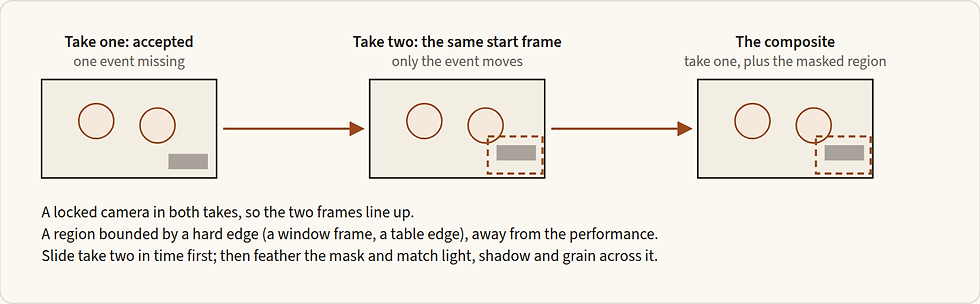
Figure 14.9 — Everything outside the dashed region comes from the accepted take. Take two contributes one event and nothing else.
You need the accepted take; its start frame; a locked camera in that take, because a composite needs the same framing; and a region for the missing event, separate from the performance you keep, bounded by a hard edge such as a window frame or a table edge. Ask for the missing event only, and hold everything else still: the quieter the rest of the second take, the cleaner the mask edge. Use the accepted take's mode, duration and aspect, with sound off. The start frame is not a pixel lock, so lay the two takes over each other and check the alignment before you commit to the mask. Slide take two in time first; then feather the mask and match light, shadow and grain across it, and check the edge at normal speed. A light that spills (a window that comes on, a lamp) is a harder region than a corner of paper. Hand on the composite as a new version, with both source takes kept and recorded and the mask region described.
14.14 Scale and continuity
A single good shot is a small achievement. A film is shots that belong together: a wide in which a room full of people stays the same room full of people, a sign whose letters survive the camera moving toward it, and a cut after which the actor's hand is still where it was.
Wides in motion
A wide that holds a whole scene shows the room, everyone in it, the geography every closer shot is cut against. In motion it is locked or given one slow move, and it is the cheapest plate. It starts from the signed geography master (10.10), and for background people a still that already places them as clusters, backs or silhouettes (Chapter 10): the words cannot rearrange a crowd the frame has placed badly.
Give the place two or three small continuing actions, and one hero. The small life belongs to the place (a glass lifted and set down, smoke from a shisha, a newspaper turned); one person carries the shot's only real action, and it ends. Keep faces near the camera to about five or six, with one or two heroes, and the rest as backs, silhouettes or depth planes; faces are reported to merge beyond that. Place background people as clusters and count them: "The six background pedestrians remain six distinct people with stable spacing, wardrobe, and direction of travel." Test an exact count before a client shot depends on it. Direct the background as a first assistant director would: real crowds move independently, at different paces, and nobody stands in a symmetrical line. The late part of a long take drifts, so several 5 to 8 second takes cut together are safer than one long one. Crowds in motion near the camera are a physics job; Chapter 13 routes them.
Signs and in-world text under a move
In-world text belongs to the world of the film: a shop sign, a label, a newspaper headline. It may be generated in the still, checked letter by letter, and then protected while the camera moves. Editorial text belongs to the film: titles, captions, logos, legal lines, end cards. It is never generated; it is composited in post from real assets (Chapter 30).
Name the text only in the still, and protect it by its shapes in the motion prompt: "The painted cream letters keep their exact shapes, thicknesses and joins as the camera approaches." Move slowly toward the sign, and keep the letters large in the frame; too fast a move or letters too small are the usual causes of drift. Say what is there rather than what is not: a passer-by's shadow can become a whole passer-by, so write "the awning's shadow holds still and the pavement stays empty". Keep a brand's wordmark unreadable until the product stops. End a sign shot with the overlay exclusion, not the blanket text line, which argues with the letters you need to keep (14.4). Never ask a video model for subtitles: Seedance 2.5's tutorial documents a 【】 subtitle mark, burnt-in subtitles cannot be removed, and its maker warns that repeating a line's words, or tying an action to single words, can trigger them.
Kuaishou states that Kling 3.0 keeps the signage of an uploaded image consistent, including under camera movement, and every returned clip still needs a glyph-level check: "supports" never becomes "preserves exactly". Text under a Seedance move, and on Wan, Veo and MiniMax, is not yet known. When a letter drifts twice, the text goes to the compositing layer.
Continuity from shot to shot
Continuity is everything the audience expects to stay the same across a cut, or through a long take, unless the film shows it changing. A model has no memory of the last shot. It holds continuity only through what you give it: the approved masters, a keyframe read from the last frame you accepted, references, or the clip itself, extended (Chapter 13). Chapter 8 (8.8) plans it: the locked wording, the states that change at a stated beat, the object ledger and the reference manifest. This section is where the plan meets a clip.

Figure 14.10 — Three things travel through a cut: what never changes (written once), what changes at a stated beat (written with its beat), and the exact state the last shot ended in (read from the file, never from the plan). Identity does not travel with them: it is re-attached from the master.
Check every frame against the first-generation master, never against the neighbouring shot. The order is fixed: the face against the face master at 200 per cent, the state against its state master, the prop's geometry against its sheet, and then the ordinary still checks. A shot judged only against its neighbour can drift by a hair each time and pass every pairwise test. A drifting frame is re-anchored, never nudged in place (8.8). If a face drifts twice, go back to the masters, not to another edit.
Read the state from the last frame; take the identity from the masters. The next shot starts where the take actually ended, so write its entry state from the accepted clip's last frame: positions, gaze, grip, breath, light, any unfinished action and any damage. The maker's option to return a clip's last frame is not on the connection, so export the accepted last frame by eye, from the probed file. Write a change with its beat: "X until [beat]; from then on Y, to the end."
Carry the residue: an unfinished breath, a gaze target, a grip, a lean, so that a reverse does not reset the actor to a neutral portrait. Damage and dirt persist through the cut and to the end of the take. Name the single instance through every occlusion: "One envelope; no second copy appears during the hand occlusion."
On Kling on the connection the start frame is the only carrier of identity, so every shot in a sequence needs its own approved keyframe. On the reference routes, bind each asset, place it, protect it, and let the manifest own the ordinals (Chapters 17 and 18). When a clip will not hold its continuity, make it shorter and cut on a sound or on something passing in front of the lens.
14.15 Format, length, resolution, handles and probing
Shape, size and length are decided in the settings, never in the words, and before the first frame is made. They are also where a platform's labels most often disagree with its files. Every fact below carries its date; each tool's section gives its own values (N.6 Settings, N.9 Limits).
The label is not the file. In probes of files returned through the connection (12 to 26 Sep 2026), Kling's "720p" came back 1284 × 716 and its "1080p" pro 1912 × 1080; a "1080p" vertical from another Kling tier came back 1076 × 1928; and Wan's job record said 1344 × 768 for a 1280 × 720 file. Probe every clip, and quote the probed raster, frame rate and frame count in the delivery notes, never the label.
Aspect: decide it first. Decide the delivery aspect before the keyframe is made, and make the keyframe at it. Overlay every target format upstream; no maker supplies a safe rectangle that survives every platform. On Seedance a first frame set through the first-frame role locks the output's aspect to the image, and a last frame at another aspect "will be stretched"; in a reference job the aspect is free. So the aspect is a decision about the still, taken on day one. Classify each shot for each version: crop-safe, needing a manual reframe, or needing its own origination. When a crop breaks the geometry, originate the version: a 9:16 version of a 16:9 shot is often a new composition, so recompose it as its own frame (Chapter 9) and animate that. When a tool lacks your aspect, generate the nearest and reframe in the edit; the connection offers Kling only 16:9, 9:16 and 1:1 (read 28 Sep 2026). Measure every vertical file, then crop or scale it. Never stretch.
Resolution: draft, judge, deliver. Resolution is a sequence: a cheap size to find out whether the shot works, a size at which you can judge it, and a size to deliver. It is the same two grades as the prompts. Draft small, and judge where you can see what you are judging: judge a mouth at the size you will deliver, and treat a 480p pass as a check of the route. Kuaishou's Kling 3.0 guide documents 720p and 1080p, and a keyframe is scaled to the output raster (a 2752 × 1536 still returned at 1284 × 716 on std, probed 26 Sep 2026), so small print and thin lines in the still will soften.
Get 4K from an upscale, and decide the upscale by looking. An upscale is a decision, not a step: run it after picture lock, on the intervals the cut uses, from neutral footage, and only if the delivery needs it. Judge two labelled previews of one hard moving interval (skin, hair, edges, a label, Arabic letters) at the same grade and framing. The delivery size decides; any change of identity or lettering is a failure; keep the native-size file; record the tool, its version and its settings (Chapter 30). Two claims stay unmeasured until a probe: Seedance's 1080p file, which the maker describes as 1920 × 1080, 10-bit H.265 (HEVC) that some players cannot open (28 Sep 2026), and Kling's 4k mode, of which the platform says only "4K resolution". Probe the first 1080p file before it goes anywhere, conform it to an editing codec if it is HEVC, and write "4k mode, provenance unverified" in the delivery notes until a file measures 3840 × 2160.
Length: buy it for the action, not for safety. The makers allow long clips (Seedance up to 30 seconds, Wan 2 to 30, Kling 3 to 15), and a long clip is not a better one. Extra seconds buy a hold, not a slower performance. Plan takes of five to eight seconds and split rather than stretch: coherence is reported to decay past about ten seconds, and the late part of a long take drifts, so two 5-second shots and a cut are safer than one 10-second take. Never use Wan's smart duration (−1); the contract says it is billed as 10 seconds, for a length nobody can plan.
Handles: probe the file and plan from what exists. No handle duration is universal, and nothing exists past a file's ends. A 5-second request on Seedance 2.5 or Kling 3.0 returned 121 frames at 24 fps, which is 5.04 seconds; a 6-second Seedance request returned 145 frames (6.04 s) and a 10-second Kling request 241 (10.04 s). Those are observations of particular files, not constants. The hold after the action is your handle, so write the outgoing hold the edit needs into the request; a shot that needs air before its action needs it written in, or an extension. Wan documents 30 fps where the Seedance and Kling files were 24: conform to the timeline deliberately, never by accident (Chapter 30).

Figure 14.11 — What a generated clip gives the editor. The hold after the action is the handle; there is no picture beyond the file's ends, so a shot that needs air before its action needs it written in.
Probe every file the day it comes back, with ffprobe (a free command-line tool), and write what you measured into the run record: the raster, the frame rate, the length, the frame count, the codec and bit depth (at 1080p), and whether there is an audio stream. Seedance sound came back as AAC at 32 kHz, stereo, and Kling sound as AAC stereo at 44.1 kHz; a clip made with sound off had no audio stream at all. The run record also keeps every attempt, failures included, with the debit and the accepted interval.
Template: the settings line for a job (settings, not a prompt; written for this book; not run)
tool and mode: [ ] · aspect: [matching the keyframe] · resolution or tier: [draft / judge / deliver] · duration: [the action + its landing + the outgoing hold] · sound: [on / off] · start frame: [file, version] · end frame: [only if the landing is the point]14.16 Checking a moving shot, the ladder, and when to stop
Before you run: read the text
One dominant camera move, verb first, its rig named; or a declared fixed frame with the motion given to the world.
Nothing the frame carries is described again; protection is by name, after the action.
The action runs through time with at most two secondary actions; the world has life.
The endpoint is a composition you can cut on, and the hold is written.
No "from frame one", no hedge-state camera words, no contradictory spatial demands, no off-frame object named.
The magnitude fits the tool: one approximate figure per system on Kling, sized from the subject's distance (14.5); pacing words and stamps elsewhere.
The vocabulary is legal for the project's period; exclusions are three or fewer on a clip (five is the ceiling), each earned; the prompt closes on the hygiene line and the sound switch is set.
For a start-and-end clip, the two frames are relatives.
After the clip, inspect in order: frame 0 against the keyframe; the action happens once; the middle holds, at 20, 40, 60 and 80 per cent; the ending holds; nothing enters; the people and props are counted. By type: a device reads as one intention, with feet on the ground, parallax behind and a usable landing; a product's label is read at full crop at the start, the middle and the end; a turn is stepped about every half second and never passes three-quarter; a contact is frame-stepped, with fingers separate and the event happening once; a reversed clip's last frame matches the signed keyframe and nothing moves against gravity; a composite's mask edge is invisible at normal speed. Then probe the file (14.15), watch it at normal speed, and judge it in the running cut at the interval the cut will use. The hold is trim material: cut it in the edit rather than regenerating.
You see | Likely cause | Smallest fix |
The prop never moves, or the action is skipped | the keyframe shows the move finished | a state-0 keyframe (a one-change edit), then regenerate |
The move overshoots (a lid closes fully) | no stopping point | write where it stops "and stays", and the composition it lands on |
A dead first second, then the photograph wakes up | a statue keyframe, or an action that starts late | a keyframe just before the action; motion at once |
The camera floats | a move without a mechanism | give the move a body, or declare the camera locked |
The background warps | stacked or fast moves | one device; slower; a simpler background |
Fingers melt at the touch | contact rushed, or the hand hidden in the still | name and slow the contact; path, grasp, rest; a cleaner grip keyframe; split at the touch |
A duplicated prop, or a phantom grip | no single instance, no release gate | "one [prop]"; release only after the grip |
An object appears from the edge of frame | something off frame was named | describe its light or its sound, not the object |
Costume or face drifts | too long, or the still already drifts | a shorter clip; protect by name; fix the still first |
A label smears or re-letters mid-move | text under motion | a shorter move; the label composited from the artwork |
A head swings through profile | only the landing was written | the short way, never past three-quarter; an end frame |
Right ends, an invented middle | the frames are not exact relatives, or the path is not bounded | rebuild the pair; orientation in positive words; shorten the travel |
A reversed clip gives itself away | something in frame moves on its own | remove it from the still, or go forward with an end frame |
The retry ladder, smallest lever first. Diagnose a failed take; do not re-roll blindly. In order: (1) re-roll once, unchanged, because variance is real; (2) reduce the intensity, slowing the move; (3) strengthen the protection by name on whatever broke; (4) simplify to one motion system; (5) re-phase, moving a measured magnitude in on Kling or out on Seedance; (6) split the shot into two clips and a cut; (7) return to the keyframe, because if three steps fail the still is the problem. Change one variable per attempt. After two failures of the same kind, change the input, not the adjectives.
Where the ladder ends. A warping device: split it into two shots, or lock the camera if the move is not the point. A morphing product: composite the label, or use references with the product attached. A failed turn: two shots cut on the look, or another tool. A broken contact: detail inserts, cut on the contact. A reversal that gives time away: forward with an end frame. A region you cannot separate from the performance: regenerate the whole shot.
The gate and the records. Three of Chapter 8's gates apply to every run: ask the platform for the exact job's price before each paid run (SPEND), clear a real person's footage or voice before it is attached (RIGHTS), and accept the clip in the cut (ACCEPT). The shot record (14.4) is written before the first generation. The run record (Chapter 8) keeps the prompt as sent, the settings, the inputs in upload order, the job number, the price, the probe line, the travel asked and measured for a measured move, the verdict, the accepted interval with its in and out frames, and the exit state. Build the next shot's start frame from the accepted outgoing frame, not from the plan, and hand the edit the probed clip with its run record.
Open questions
Does Kling honour a stated distance, and how closely? No maker documents it and no measurement is on record; 14.5 answers it clip by clip. Kling 4.0 (announced 28 Sep 2026) may change the answer.
Do Seedance 2.5 and Wan 3.0 respond to an approximate distance in prose? No maker says. Use one only as a repair.
Does the connection pass Seedance 2.5 time stamps and Kling's in-take markers? A route fact, settled by one run.
Camera devices, reverse motion and the composite repair are written from craft and from other directors' reports; none has been proved on a current model.
Which frame to export for the next start frame is unsettled, because the maker's return-last-frame option is not on the connection: export the accepted last frame by eye.
Does a bounded path keep a turn inside three-quarter? Turns pinned with an end frame have not been run.
What to remember
The frame owns appearance, the words own change, the settings own the rest. The frame is a strong reference, not a pixel lock: protect by name and compare frame 0 with the keyframe.
Sign the start frame at the state the clip begins in, with directional evidence written as positions. A frozen system in the still is a motion the clip owes.
A finished prompt has seven elements in order: the declaration with its rig, the action, the world's life, protection by name, the endpoint, the pace, and earned exclusions with the hygiene line. The first sentence carries what the shot is about.
Give every move a body, name one mechanism, and never write a hedge word for the camera: declare it locked and give the motion to the world.
Size a push with E = D ÷ (D − d), choose the subject's distance as well as the travel, and measure the returned clip on a rigid feature.
End every prompt on a composition you can cut on, then a hold.
Pin both ends only when the landing is the point. Make the frames relatives, describe the travel, bound the path and check the middle.
A device is one intention only when all five parts are written. A product gets one small move with a visible cause and a stop. A turn's path is written as well as its landing.
Check against the first-generation master, read the next shot's state from the last accepted frame, and carry the residue.
Shape, size and length are settings. The label is not the file: probe every clip, buy length for the action, and treat the hold as the handle.
The same failure twice means you change the input, not the adjectives.


Comments