
Chapter 13 · Choosing the route

Part 3 · Motion
A still is one decision. A moving shot is two: what must survive from the pictures and words you already own, and what the model is allowed to do with them. This chapter teaches the choice every shot in Part 3 begins with: the operations, the one-line record of the choice, when to leave the start frame behind, why a cut should not be baked into a clip, and which tool offers what.
In this chapter
The operations, from text to video to extension and the wordless plate
The route line: eight parts, written before the prompt
When to leave the start frame behind, and what that costs
One shot, one clip, and the four grounds for several shots in one generation
Which tool offers which operation (Chapters 16 to 19), dated
The checks, the gate and the records
Before you start. Chapter 8 sets the four gates and the three records. Chapter 9 makes the signed stills that most shots start from, and Chapter 10 the anchors that references need. Chapter 14 teaches the motion prompt itself.
13.1 What this stage decides, and who decides it
Part 2 made stills. Part 3 moves them, and it opens with a decision no prompt can make for you. Every video tool starts from words, and most can start from a picture; what differs is what each input fixes and what it leaves to the model. An operation that protects the wrong thing cannot be rescued by rewording.
The director states the invariant, the one sentence that says what the shot cannot lose, or approves the one the assistant drafts. Whoever operates the models writes the route line and runs the job. Only the director accepts a clip. Acceptance matters more here than for stills: a clip costs more than a still, and a flaw can hide in its middle.
Five video tools are covered, all reached through the same account as the stills (Chapter 33): Kling (Chapter 16, with 4.0 as announced on 28 Sep 2026), the tool for camera moves from a signed start frame; Seedance 2.5 (Chapter 17), with the widest set of operations; Wan 3.0 (Chapter 18); Veo 3.1 and MiniMax H3 (Chapter 19). Chapter 20 lists others.
Some words mean something particular in Part 3.
Word | In this book |
Clip, take | a clip is one generated video file; a take is one clip of a shot |
Operation | what a job does: make a shot from words, animate a frame, travel between two frames, compose from references, edit a clip, extend a clip |
Start frame, end frame | a signed still the clip must begin on, or land on |
Reference | a picture, clip or sound that lends a face, a product, a place, a camera path or a voice without fixing the frame |
Invariant | what must survive the shot unchanged |
State 0 | the instant before the action: the frame a clip starts from |
Endpoint, hold | the composition the clip lands on, and the still seconds after the action ends |
Plate | in Chapter 10 a still of a room or a product; from here also a clip made for another tool or for compositing, such as the wordless talking plate for lip sync |
13.2 The operations
An operation is what a job does. Seedance's maker documents that its model sorts a job by the intent of your words and the inputs you attach; the other tools offer fewer operations, but the same trap exists on them.
Decide what must survive the shot, choose the operation that protects it, and only then write. If the connection does not expose the control you need, change the route (separate shots cut in the edit, or a fix in post), not the words.
Start from the invariant. A literal first frame calls for a start frame; a landing, for start and end frames; a face or a product without a fixed frame, for references; one wrong thing in an accepted take, for an edit; a take that is too short, for an extension; your exact recorded line, for a wordless plate and lip sync. Figure 13.1 sets out the choice.
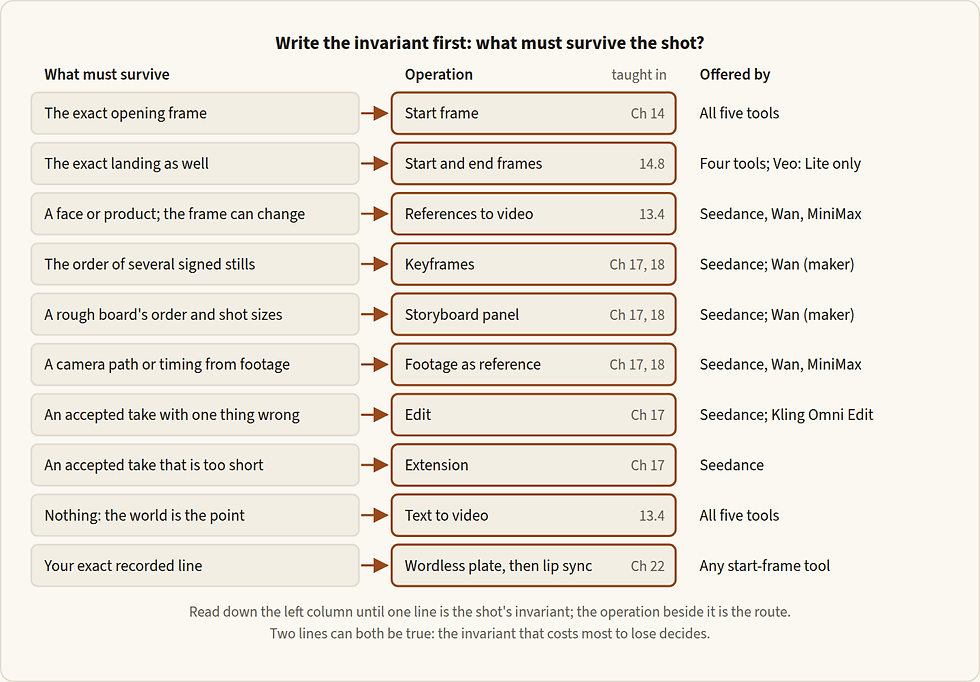
Figure 13.1 — Choosing the operation. Read across from what must survive. The last column names the tools that offer the operation (13.6 gives the table, dated). For a speaking shot, the contract decided at the start of the project chooses between the exact take, through a wordless plate and lip sync, and a new performance (Chapter 22).
Text to video. Nothing is attached. The model invents the place, the light, the people and the composition, and moves them. What you give up, and the four grounds on which the trade is worth making, are in 13.4.
Still to motion. The signed still is frame 0 and the model moves it. The frame owns what exists and the prompt owns what changes. Composition, identity, art direction and light are approved before any clip is paid for, so this is the default operation for a commercial (Chapter 14).
Start and end frames. Both ends are pinned. The two frames must be relatives, the prompt describes the travel between them, and the middle is the model's own. Use the pair when the landing is the point (14.8).
References to video. Pictures of the people, the product and the place are attached, and no first frame is fixed: the model composes a new shot and keeps who and what you showed it. The prompt binds each picture to one job, places the subject, and protects what the action could break (13.4).
A keyframe sequence, or a storyboard panel. Two ways to hand a video model several pictures in order. Keyframes are two to four signed stills that the clip passes through; Seedance's maker says the video "will align relatively strictly" with them. A storyboard panel is one image holding a line-art board, which "mainly provides a high-level plot reference". Seedance carries both (Chapter 17); Wan's maker documents both (Chapter 18).
Footage as reference. A clip is attached so that a new shot can take one thing from it: a camera path, a timing, where people stand. A phone rehearsal or a blockout of plain shapes will serve. A clip passes everything in it unless you fence it: name the one or two channels the new shot takes, and send the rest, by name, to "take nothing of".
Edit. An accepted clip is redrawn with one thing changed inside it. Edit here does not mean cut. It is the operation for a take whose performance is right and whose one prop is wrong. Some tools lock the result's aspect and length to the source, so an edit cannot lengthen a clip, and a vertical version of a horizontal clip is a reference job, not an edit.
Extension. New footage is joined to one end of an accepted clip. Write what happens ("continue from the last frame", "before the first frame"), not a bare direction: Wan reads "forward" and "backward" the other way from Seedance (17.3, 18.3). The prompt restates the state at the join, read from the file, and describes only the next beat. One extension should join cleanly; a second is a warning to regenerate the shot.
A wordless plate for lip sync. When your approved recorded line must ship, the clip is made without words and a lip-sync tool fits the mouth to the take. A project decides once, at the start, whether it takes this route or lets a video model perform the line anew (Chapter 22).
Writing for the operation you chose
One task per job. A job makes a new shot, edits one clip, or extends one clip. When a request mixes a reference task and an edit, split it: a reference pass that makes the new element, then an edit pass.
Let the first sentence carry the operation. For a start frame: what the shot is about. For start and end frames: the travel between them. For references: the lines that bind each picture to its job. For an edit: the task word and the change from A to B. For an extension: the direction and the state at the join. Keep the other operations' task words out; "replace", "remove", "continue" and "extend" can turn a reference job into an edit or an extension.
Classify by the invariant, not by the input you happen to hold. A grey blockout is a reference for a new shot, not an edit source. A finished clip whose camera and timing must survive is an edit source. An accepted clip that needs more time is extended if it must stay intact, and used as a reference if it only lends continuity.
13.3 The route line
The choice is recorded in one line, the route line. It lives in the shot table and in the shot record's parameters (Chapter 8), and it travels with the prompt into the run record. It is written before the prompt. It has eight parts.
Invariant. What must survive, in one sentence.
Operation. One of the operations of 13.2.
Grade. Finished or test (below).
Model and mode. The tool, and the mode that selects the operation.
Inputs in order. Each file, its role and its version, in the order it will be attached.
Settings. Duration, resolution, aspect and the sound switch.
Reason. One line on why this operation and no other.
Fallback. What you do if the operation fails twice: separate shots, a cut in the edit, a fix in post, or another tool.
Template: the route line (written for this book; not run. A line for the shot table and the shot record, not a prompt)
Shot [id] · invariant: [what must survive] · operation: [text only / several shots / start frame / start + end / references / keyframes / storyboard / video reference / edit / extension / plate for lip sync] · grade: [finished / test] · model and mode: [tool and mode] · inputs in order: [role: file, version] · settings: [duration, resolution, aspect, sound] · reason: [one line] · fallback: [separate shots / prose cut / post / another tool]Two grades of motion prompt
Every motion prompt in this book is written at one of two grades. The finished grade is the prompt for a clip that may be delivered: the seven elements of Chapter 14, complete, with a record beside it. The test grade keeps the essentials only, to prove a route or a look cheaply. It is never the model of a finished clip.
Use the finished grade for any clip that may reach the cut: a hero shot, a face, a sign or a product, a move whose failure costs a day. Use the test grade to find out whether a tool accepts an operation, whether the frame survives, or to compare two routes. When a test-grade clip shows that a route works, rewrite the prompt at the finished grade before the run you mean to keep.
Choosing the route
Write the invariant in one sentence.
Map it to an operation with Figure 13.1, and decide the grade.
Check that the connection exposes that control today. Read the day's contract for the tool: the settings and inputs the platform publishes for it. It changes. If the control is missing, note the maker-only feature that would do the job, and choose the fallback.
Write the route line, with its one-line reason and its fallback.
Only then write the prompt, opening with the operation's first sentence.
Written for this book · food and drink · route lines for four shots of a 15-second beverage spot, Kling 3.0 and Seedance 2.5 · not run
Example 13.1 — one spot, four operations
Shot 01 · invariant: the signed opening frame, the can on the wet café counter, framing exact · operation: start frame · grade: finished · model and mode: Kling 3.0, start frame · inputs in order: start_image: 01_counter_v3 · settings: 5 s, std, 16:9, sound off · reason: the push-in is the shot and the frame is approved · fallback: Seedance 2.5, omni-reference, the same frame
Shot 02 · invariant: the client-approved packshot as the last frame, label square to camera · operation: start + end frames · grade: finished · model and mode: Kling 3.0, start and end frames · inputs in order: start_image: 02_can_left_v2; end_image: 02_packshot_v1 · settings: 5 s, std, 16:9, sound off · reason: the landing is the point · fallback: two shots cut on the stop, label composited from the artwork
Shot 03 · invariant: Nour's face from her master; the rooftop is negotiable · operation: references · grade: test, then finished · model and mode: Seedance 2.5, omni-reference · inputs in order: image: Nour_master_v2; image: can_ref_v1; image: rooftop_plate_v1 · settings: 5 s, 480p to test and 720p to keep, 16:9, sound off · reason: coverage speed matters more than authoring the frame · fallback: sign a keyframe of the rooftop and take the route of shot 01
Shot 04 · invariant: the accepted take of the toast, everything except the ring pull · operation: edit · grade: finished · model and mode: Seedance 2.5, video edit · inputs in order: video: 04_toast_take3 · settings: as the source, sound as the source · reason: the performance is right and one part is wrong · fallback: regenerate from the start frame with the ring pull protected by name
Each line names one operation, so the prompt that follows opens with that operation's first sentence and carries no other operation's task word.
The invariant decides: shot 02 pins both ends because the landing is approved; shot 03 lets the frame go because the face must not move.
Every line has a fallback, so a second failure changes the route and not the wording.
13.4 When to leave the start frame behind
A video tool can receive its pictures at two moments. Either you make the frame first, approve it as a still and hand the tool that one picture (the keyframe route, Chapter 14); or you hand it the anchors themselves, the faces, the product and the room, and it composes the frame while it makes the motion (the reference route). One question chooses between them: is the exact frame negotiable?
No. A client approves the still, or the light and the composition are art-directed: the keyframe route.
Yes. Coverage speed, a large camera move, heavy re-blocking or the economy of one call matter more than authoring the frame, and the people and objects fit inside the tool's reference limit: the reference route.
A reference shot gives you a composition you did not have to design, and did not design: the first time anyone sees it is in the returned clip.

Figure 13.2 — The same anchors feed both routes; what changes is where they attach. The keyframe route spends one extra generation to approve the frame; the reference route folds frame and motion into one call.
The two routes never mix inside one shot. A motion call that receives a keyframe and also the anchors hands the model two competing identity sources and undoes the approval the keyframe carried. A reference call that treats its picture as an approved keyframe skips the approval the keyframe route exists to give. The one combination is a maker's own: Kling documents a start frame plus bound Elements, where the frame governs the opening composition and the Elements hold identity under motion. The connection does not expose Elements (read 28 Sep 2026), so on it a Kling shot is a start frame and words.
Inputs differ above all in how much of the frame they fix (Figure 13.3). A picture sent as the first frame is followed strictly; the same picture sent as a reference gives similarity, and the video "may not match" it exactly.

Figure 13.3 — Four ways into a moving shot, from the most fixed to the loosest. The maker's own words place keyframes near the start frame ("relatively strictly") and the storyboard at the loose end ("a high-level plot reference").
Text to video
Text to video is the extreme case: nothing is fixed, and composition, identity and light become probable outcomes of the prompt. Four grounds justify the trade; every other shot goes to a start frame or to references.
The participant camera. Point-of-view and camera-as-body shots, where the truth of the shot is continuous subjective motion and no single frozen frame is the shot.
Continuous transformation. Beats defined by becoming (forming, dissolving, assembling), where any keyframe would freeze the wrong moment.
Variance-tolerant ambience. Establishing and atmospheric shots where several compositions would do: weather, a street, a crowd, a texture.
Exploration. Drafting movement, energy or coverage cheaply before you commit keyframes.
What you give up is identity. A name and a paragraph will not give you the same face twice, and a description will not give you your client's product. A recurring character or object enters a text-to-video shot only by reference, or not at all. The second thing you give up is the exact composition. If the composition must be exact, make a keyframe and animate it.
If a text-to-video shot comes back with a composition you like, export a frame, sign it as a still, and start the next shot from it.
The entry card for a shot with no start frame
Variance budget. List what may vary (an anonymous face, the background layout, a crowd's arrangement) and what may not. If composition, identity, product geometry, geography or exact text cannot vary, use a start frame or post.
One-shot truth. Describe the shot in one sentence with one dominant action and one camera behaviour. If the sentence needs "then cut", it is several shots (13.5).
Identity route. Recurring people enter only by reference. Anonymous or archetypal figures are the natural citizens of this operation.
Text route. No final titles, captions, counters or logos; in-world lettering needs a per-letter check and a repair plan (Chapter 10).
Exit condition. Name the cuttable final composition, not merely the end of an event.
Writing and running a reference shot
A reference prompt does four jobs, in this order: bind each attached file to a number, a name and one job, with what it must not give; place the subject, shot size and camera first, then who is in frame from the first moment; lock identity to its file; protect what the action could break, after the action. Describe in full only what no file carries. Each tool binds in its own syntax (N.3 in Chapters 17 to 19); 14.2 sets the anchor's two routes into a clip side by side.
From signed stills to a clip made from references
Sign the identity masters first (Chapter 10): a neutral first-generation master for every face. Every later call attaches the masters; a derived frame never becomes the authority for a face (10.2).
Make what the shots need beyond the master: a sheet for a profile or a back view, and a location plate with nobody left in it.
Write the prompt's manifest (10.5): each file's number, name, one job and one fence, in the order the subjects first appear.
Price the job, draft at the cheap size and keep at the size you judge at.
Probe and inspect: count the people, check each face against its master, look at the opening and the end.
Decide: keep the clip, or rebuild the shot as a keyframe shot.
13.5 One shot, one clip; several shots in one generation
Several tools can put several shots, or several timed beats, into a single clip. Seedance's maker says one request can run to 30 seconds and present "a complete story without multi-segment stitching"; Wan documents multi-shot prompts in segments of 2 to 5 seconds; Kling's own app has automatic and custom multi-shot. That is capability, not a reason. Multi-shot bakes the edit. Cut points, shot lengths and coverage move from your timeline into the prompt, and a weak cut cannot be re-rolled without regenerating its neighbours.
So one shot, one clip is the default, and the edit stays in the cutting room (Chapter 29). Four grounds justify several shots in one generation; write the one that applies into the shot record.
Intra-generation continuity. Beats that must share one unbroken envelope of light, physics and identity that separately generated clips would fracture.
Rhythm-locked montage. Cuts that must land on the beats of a music or reference track at generation time.
Conversational coverage. Shot-and-reverse-shot patterns the model cuts natively.
Speed-and-cost formats. Social cutdowns and drafts, where per-shot control is worth trading for one pass.
For a hero film the edit is authorship and stays in post.
Several shots in one generation
Write the justification: which of the four grounds applies. If none does, generate the shots separately.
State the shot count and the total length in the summary line.
One beat per line: its time range, shot size and camera, one main action, its end state, what we hear.
Write each transition as a trigger and a method, and name where a fast move lands.
List the constants once: identity, costume, light direction, screen direction. Read every beat against them before you spend.
Ask for the price and generate at the cheap size first. Length multiplies the price: thirty seconds costs six times five.
In the edit, split the clip at its cuts and judge each shot as its own interval; note the in and out points you would use.
Divide the time in whole seconds with no gaps ("0–3 seconds … 3–7 seconds"), and never time a rapid repeated action: "shake your head three times per second" is the maker's own example of what not to write. A transition needs its trigger and its method: "At the 5-second mark, the camera quickly transitions leftward using a left wipe combined with a natural dissolve."
Tools differ in how a cut is written: Seedance reads whole-second stamps and "Shot N" labels, Wan reads segments, and on the Kling connection a cut is a sentence inside the prompt (N.3 in Chapters 16 to 18). Where a start frame is used and the clip cuts to a second framing, that framing has no picture: the tool designs it from your words, so its look is written in full, as in text to video.
Reading the result. Count the cuts against the shot count; check each shot's one action and end state; watch identity and costume late in the take. If two runs bake a cut you would not choose, generate the shots separately. Hand the clip on as named sub-clips with accepted in and out points.
13.6 Which tool for which operation
The table gives what each tool offers, checked 30 Sep 2026. Yes means the operation is offered on the Higgsfield connection, as its contract was read on 27 and 28 Sep 2026, and documented by the maker. Maker means the maker documents it and the connection does not offer it. A dash means neither. Kling 4.0 (announced 28 Sep 2026; full release due in October) is not on the connection yet, so the Kling column is 3.0. Chapter 16 covers 4.0 beside it; re-read this table on the day the connection lists it.
Operation | Kling 3.0 (Ch 16) | Seedance 2.5 (Ch 17) | Wan 3.0 (Ch 18) | Veo 3.1 (Ch 19) | MiniMax H3 (Ch 19) |
Text to video | Maker; connection unconfirmed | Yes | Yes | Yes | Yes |
Start frame | Yes | Yes | Yes | Yes | Yes |
Start and end frames | Yes | Yes | Yes, never with references | Maker; on the connection the Lite variant only | Yes |
Image references | Maker (Elements) | Yes | Yes | Maker (three images, 8 s) | Yes |
Footage as reference | Maker (Omni) | Yes | Yes | — | Yes (audio never alone) |
Edit a clip | Yes, a separate model (Omni Edit) | Yes | Maker | — | — |
Extend a clip | Maker | Yes, forward or backward | Maker | Maker (Veo clips only) | — |
Several shots in one clip | Maker (Multi-Shot fields); on the connection, a cut written in the prompt | Yes, in the prompt | Yes, in the prompt | — | — |
Keyframes, storyboard panel | — | Yes (documented; not yet run) | Maker | — | — |
Sound switch | on or off | on or off | on or off | always on (Lite: off by default) | always on |
Clip length | 3–15 s | 4–30 s | 2–30 s | 4, 6 or 8 s | 4–15 s |
Read the table as a map, not a promise: each tool's section gives its ceilings, prices and rights (N.9). The tool is the second choice, after the operation; there is no default model for a silent move from a keyframe, so choose by what the shot needs.
The shot needs | Try first | Why |
The camera is the shot: a dolly, a track, a crane; a small move whose size matters | Kling 3.0 | its maker writes camera language first, and the measured move of 14.5 is built for it |
Lettering that must survive a gentle move | Kling 3.0 | Kuaishou states that it keeps the text of an uploaded image consistent; every letter still needs a check |
Heavy physics (liquid, cloth, crowds), or a choreography taken from a reference video | Seedance 2.5 | its maker documents ordered, causal action, and it takes reference videos |
A face or product with no fixed frame | Seedance 2.5 or Wan 3.0 | both bind pictures by number and role |
A cheap plate to prove that a still moves, or a very cheap candidate | the cheaper of Kling and Seedance on the day; Wan 3.0 after a test | the test grade is enough |
A speaking shot | delivery dialogue has its own route | |
Sound-led English action, or a premium wordless plate; a 2K picture from a keyframe | Veo 3.1 or MiniMax H3 (19.1) | roles to test; neither sound can be switched off |
13.7 The checks, the gate and the records
Before you send
The route line is written, with a grade and a fallback.
The number of people in the prompt matches the frame.
The attachment order matches the numbers in the text.
The start frame shows the instant before the action (14.3).
For speech, the line in the prompt and the recorded take agree.
No setting (aspect, duration, resolution) is written in the prose.
Three of Chapter 8's gates apply here. SPEND: ask the platform for the exact job's price, at no cost, before every paid run (Chapter 34). RIGHTS: footage of a real person, a real voice or a client's material is cleared before it is attached, not after the clip is made (Chapter 34). ACCEPT: the director accepts the clip in the running cut, at the interval the cut will use (Chapter 29).
When a clip comes back, ask first whether it did the operation you chose, then whether the invariant held: frame 0 against the keyframe, the landing, the middle, only the scoped change in an edit, the join in an extension.
You see | Why | Smallest fix |
An edit came back as a new shot, restyled throughout | wording that reads as a new shot, or no task word | task word first, the change from A to B, the protected list; else composite in post |
A reference job copied the source clip's person or room | edit wording in a reference job | remove "replace" and "instead of"; say the clip supplies only its camera path |
An extension restarted the action | no stated state at the join | the extension mode with its direction; the join state read from the file |
The stop rule. The same failure twice means you change the operation or the input, not the words. The smaller levers, one at a time, are the retry ladder of 14.16.
The records. The route line goes into the shot table row and the shot record's parameters; the run record keeps it with the prompt as sent, the inputs in upload order, the job number, the price and the verdict. A route that changed mid-shot is recorded as two rows.
Open questions
Kling 3.0 with no frame. Whether the connection accepts a Kling 3.0 prompt with no start frame is unconfirmed; a free price check with nothing attached settles it.
Edit and extension on the connection. Whether Seedance's edit and extension modes pin the task, or leave it to the words, is not yet known. Set the mode, and keep other operations' task words out.
Kling 4.0. Which of its announced references and keyframes reach the connection is known only when it is listed.
What to remember
Write the invariant first, choose the operation that protects it, and only then write the prompt.
The route line has eight parts and goes into the shot table, the shot record and the run record.
The test grade proves a route and is never the model of a finished clip.
Leave the start frame behind only when the frame is negotiable, and never mix a start frame with anchors in one shot.
Text to video gives up identity and exact composition; it earns its place on four grounds.
One shot, one clip. Several shots in one generation bake the edit.
The same failure twice means you change the operation or the input, not the words.


Comments