
Chapter 25 · Music and sound for a commercial

Part 5 · Music and sound
A thirty-second spot is often remembered by its sound: the tick of a lid, one held note, the silence before the product. This chapter teaches sound as a department the director runs, whichever tool makes the files. It covers the plan that says what the sound must do, the brief for a cue, the choice between cutting to music and scoring to picture, the list of every event on the picture and who owns it, the way to describe a sound as a physical event, and the placing, layering, loudness and handoff that turn recorded, licensed and generated files into a track a mixer can finish.
In this chapter
What the sound stage decides, who decides it, and the five layers every mixer works in
The sound spine: motifs, layers, and silence written as a cue
The composer brief, theme first; music-first or picture-first; choosing and placing a cue
Spotting: every event, its frame and its owner
An effect as a physical event heard from a place; record, library or generate
Perspective, timing to the frame, beds and room tone, designed transitions and repairs
Loudness to the delivery specification, and the handoff to the mix
Before you start. Chapter 8 teaches the records and the four gates this stage writes to. Chapter 21 makes the voice and settles that the edit owns all sound. Chapter 29 is the cut the sound is laid into, Chapter 30 finishes it and Chapter 31 hands it over. The tools are Suno (Chapter 26), Eleven Music (Chapter 27), the effect and music generators (Chapter 28) and ElevenLabs, whose sound effects are in Chapter 23. Chapter 34 covers rights and terms across the whole job.
25.1 What this stage decides, and who decides it
The edit owns all sound. A video model may return audio with a clip; treat it as scratch, or as a timing reference, and never as part of the mix (Chapter 21 says how to judge it). What ships is a set of files that someone recorded, licensed or generated for a row on a sheet, and that an editor has placed, layered and balanced against the picture. Whoever runs the tool, you decide what the sound must do and you sign what comes back.
Decision | Who | Where it lives |
Whether music enters, what it does, what stays silent; which road the cut takes | you | the spine (25.2), the cue sheet (25.3), 25.4 |
Every event, its frame and its owner; where each sound comes from | you, with the editor | the spotting sheet (25.6) and the route on the row (25.8) |
Making the file: recording, library search, generation | whoever runs the tool; you approve | the run record (8.7) and the workbook's sheet for music cues and sound effects (8.9) |
Placing and layering | the editor | the timeline, and the placement on the row (25.10) |
Level, balance and loudness | the mixer, against the delivery owner's specification | the handoff sheet (25.16) |
The gates are Chapter 8's: the spend gate before a generation or a music plan is bought; the rights gate before any file enters a client cut, because every file carries its rights line; the acceptance gate when you sign the placed track in the running cut. The stage writes five records: the spine, the cue sheet, the spotting sheet, the workbook sheet that holds one row for each cue or effect with its source, file, timing and rights line, and the handoff sheet.
Word | In this book |
DX, AMB, FLY, SFX, MX | the five layers: dialogue, ambience, Foley, designed effects, music |
Foley | a contact that matches the picture, performed or recorded: a spoon, a step, a lid |
Designed effect | a sound stylised on purpose: a sweep into a macro, a whoosh on a whip pan |
Ambience, bed | continuous sound that holds a scene together across its cuts |
Room tone | the sound of the room with nothing happening in it: the floor under silences and dialogue edits |
Event, continuation, release | a sound with a frame (a tap); a sound that lasts through an action (a scrape); the moment it lets go |
Transient, attack, decay | the sharp front of a sound, the way it starts, and the way it dies |
Hard sync point | a sound that must be seen and heard on the same frame |
Diegetic | in the story's world (a voice, a door); non-diegetic: for the audience only (score, voice-over, a stylised whoosh) |
First attack, button, cutdown | the first note you hear, not the start of the file; a short definite final note, not a fade; a shorter version of the film, such as 15 seconds from 30 |
25.2 The sound spine
Write the spine before any sound is made, and write silence as a cue.
A spine is a map of the film, scene by scene, of what its sound must do. It has three parts: three to five recurring motifs (a figure, a sound or a texture that comes back changed); the five layers tagged for each scene, each with the beat it enters on; and silence written as a cue, with an entry and an exit. For every change of emotion it names the mood and the key sounds. Draw it early enough to shape the pictures, because a beat the film needs for one sound is a beat the edit must leave empty.
A thirty-second spot has a spine of four or five lines: one motif (a three-note figure, or the click of a lid), a bed under the whole spot, the beat held before the product, and the ending.
Template: the spine (written for this book; not run)
SPINE — [project], [length and versions]
Motifs: [one to three: a figure, a sound, a texture] · returns [where] · changes [how]
Scene or beat · DX · AMB · FLY · SFX · MX — each with the beat it enters on
Silence: no music [from–to; what stays] · no sound at all [from–to]
World: each cue in the story's world or outside it
Two kinds of silence are written. No music keeps the scene's own sound: in the Mastorna trailer's plan, after the storm the shot table keeps "Heavy rain on cobblestones; distant church bell tolling", and for the station's bureaucratic scene it keeps the announcement and "Luggage sounds: leather, clasps, thuds". No sound at all keeps nothing, not even room tone: the plan writes "No room tone, no hiss" at the start, "No music, no crowd, no room tone" after the orchestra stops, and "COMPLETE SILENCE — no music, no sound, no room tone" for the last six seconds. A silence is a decision on the sheet, never a gap a generator leaves.

Figure 25.1 — The Mastorna trailer's sound plan: the music cues in one row and the stretches with no music in another. The times are the shot table's planned lengths, not the timed cut.
Tag each cue as in the story's world or outside it. In-world sound is placed by where its source is; score, voice-over and stylised sweeps sit over the picture on their own tracks, so the audience never takes them for a source on screen. The Mastorna plan calls the nightclub music "diegetic", heard through the curtains, and names the cello cues by number, outside the room. In a beauty spot the click of the lid is in the world and the score is not.
Mix with a hierarchy, and judge density by the story. Dialogue first, music beneath it, effects by their importance to the story: a key effect cuts through at the moment it happens, then blends back. That order is a judgement, not a numeric law. The film sound editor Walter Murch gives the working limit: at any one moment "five layers is the maximum that can be tolerated by an audience" who are to keep a clear sense of each element, and when sounds stack up in one region of the spectrum "the limit shrinks to two-and-a-half"; a mix should be "as dense (or as loud) as the story and events warrant". Spread the layers across dialogue, music and effects, and remove a layer before you turn another down. A duck of 3 to 6 dB under speech is a starting point, set by ear; it is not a rule and it is not a level.
Feeling in the spine, physics in the prompt. The spine says how the scene should feel; the prompt names the physical sound that makes it feel that way (25.7).
25.3 Whether music enters, and the composer brief
Decide what the music does before anything is generated, and whether it enters at all. Write its function in one line, in story terms, and approve the line. The Mastorna brief's line for the first cue of the trailer is "Introduce the motif in plain, human form before rupture": it tells you when the cue is doing its job, where "emotional underscore" does not. If music would only hide weak acting or a missing shot, take the problem to the picture. Write the entry and the ending before the sound: the beat the cue enters on, and a clean stop, a decaying tail or a near-silence for the end, because a cue with no written ending fades or loops.
The brief is your document, not a prompt. The same brief feeds Suno (Chapter 26), Eleven Music (Chapter 27), Lyria (Chapter 28), a composer or a library search, and only its translation is pasted. It is written from the picture the cue will sit on (a stillomatic, which is a rough cut of keyframes held to measured lengths, or a cut, with its date); from windows measured on that picture (stretches of picture, in seconds, where something must happen: the entry, a line, a contact, the turn, the exit, each marked hard, it must land, or flexible, a range); from the delivery versions (30 s, 15 s, vertical); and from the scene's row of the spine.
Brief a cue around a theme, not a mood.
The rule for the Mastorna trailer was set before any cue was written: each prompt is "THEME-FIRST, not mood-first", built around "one recurring singable tragic motif that transforms across the trailer". It forbids the requests that name an average: "trailer music", "cinematic suspense", "epic orchestral", "haunting score", and any "in the style of" a composer. It asks instead for the cue's form, what the theme does, its harmony, how it is performed, and what must not happen. A commercial is rarely two and a half minutes. For a 15 or 30 second spot the theme is one small figure, a three-note figure or a single phrase, that survives the cutdown. No maker states that a model holds a named motif across a cue; the practice is the director's, so write what the figure does in every cue (stated plainly, broken into cells, deformed, thinned) and listen for whether it survives.
Write the brief in this order, one directed paragraph, most important content first.
# | The part | What it settles | How it reads |
1 | Form and function | what kind of piece it is and what it does for the picture | "a dry plucked pulse cue that gives the product's touch forward motion" |
2 | Theme behaviour | the one figure, and what it does in this cue | "a three-note figure, stated alone, then under the voice, then alone on the last note" |
3 | Roles | one lead; three to five instruments, each in the singular; what accompanies; what is absent | "plucked synth leads; a warm bass pulse; brushed percussion only after the figure; no pads, no drums" |
4 | Arc, entry and ending, as behaviour | how it starts, what changes, how it stops | "enters one beat after the jar lands; does not build; ends on a resolved note that decays" |
5 | Harmonic identity | a mode or key centre, one characteristic interval, cadence behaviour | "a plain mode, one gentle opening in the last phrase, no heroic cadence" |
6 | Performance and room | tempo feel, steady or rubato, dry or close, the recording's era | "steady and unhurried, dry and close, small room" |
7 | Speech space | where a voice sits and what steps aside | "the middle register nearly empty for a close female voice" |
8 | Tempo, approximate, last | a number as guidance, measured on the file later | "about 96 BPM" |
Around the paragraph sit the refusals, the section map and the controls. Write refusals apart, each with a positive twin in the text: "no sentimental romantic sweep" pairs with "the melody presented plainly and with emotional reserve". Refuse only sounds this cue could turn into, and keep a conditional refusal ("no choir in the verse") inside its section, because a refusal that holds for the whole cue would forbid it in the ending too. Name no artist, composer or singer anywhere a tool will read. Some tools block a name in moderation and every name is a rights problem; describe what the name sounds like. A reference track is analysed, not named: write its tempo feel, section lengths, harmonic posture, motif behaviour and climax in your own words. Regional sound is a set of roles: "one darbuka as a pulse, occasional accents, not a folkloric lead". A nationality is not a genre. Refuse the reflexes: the oud swell on the reveal, the piano-and-strings family bed. The director and a local cultural collaborator decide a regional palette.
Put no seconds in the prompt as commands. Suno's help says its tempo "is not consistent over time, just like live music", and Google's music-generation page says results "may vary between calls, even with the same prompt" (checked 30 Sep 2026). Give a model the order of picture events and section names; the timeline holds the exact time. Plan three candidates: A as briefed, B and C each changing one thing (the lead, the tempo feel or the vocal choice, never all three), and run the brief twice as written before you change a word. An identical repeat measures how much the tool varies; a changed prompt measures your change. Write how you will choose before you listen: fit to the job, a clear motif, an energy curve that follows the timeline, no artefacts.
Written for this book · beauty and personal care · a cue sheet for a 30-second face-cream spot, no tool; the layout is the template for every cue, and Chapter 26 turns it into fields · written for this book; not run
Example 25.1 — the cue sheet for one cue
CUE 1 — "the jar lands", 30 s face-cream spot — picture: rough cut v2, 24 fps
Function: a dry plucked pulse cue that gives the product's touch forward motion under the voice and rests on the product hold · enters at all because the macro shots have no dialogue to carry them
Windows: entry 1.0 s, flexible (one beat after the jar is set down) · voice-over 6.0 to 24.0 s, hard · application 9 to 15 s · face 15 to 22 s · lid stop 24.4 s, hard, on the effects track · product hold 24 to 30 s
Entry / exit: enters one beat after the jar lands; the resolved last note lands after the lid stop and decays through the hold
Theme: a three-note figure on dry plucked synth · stated alone, then under the voice, then alone on the last note
Roles: lead plucked synth; under it a warm restrained bass pulse; brushed percussion only after the figure is established; absent: drum kit, pads, choir; speech range open for a close female voice from 6 s
Harmony and room: a plain mode, one gentle opening in the last phrase · dry, close, small room
Tempo feel: steady, unhurried; about 96 BPM, measured on the file later
Refusals: vocals, orchestral trailer sound, long fade
Lengths and versions: 30 s full length; the 15 s is a new structure that keeps the figure and the last note
Rights line (34.10): [filled when the file is made]
Candidates: A as briefed; B changes the lead; C changes the tempo feel · each run labelled repeat or changed prompt
Why it works
The function is a job in story terms, and the reason music enters at all is written.
The windows are picture events marked hard or flexible; the seconds stay on the sheet and never reach the tool.
The theme is one small figure and the sheet says what it does; the cutdown keeps it.
The lid stop is a hard event on the effects track, and the music's last note is placed after it.
When one-change candidates keep missing the function, the brief is wrong, not the prompt. When the theme is lost under the colour, put the theme sentence first and cut the instrument list to the lead and two others.
25.4 Music-first or picture-first
Choose the road by what carries the story. When dialogue, performance or comic timing leads, cut the picture first and score to it. When rhythm, montage or a product's beats lead, lock one cue and cut the picture to it.
No maker settles this; it is craft. Picture-first is the usual road for a scene with speech: the picture is measured, the cue is written to its windows, and its entry is placed in the edit. Music-first is the road for a montage or a spot whose beats are the film: the cue is locked first, and the shots are cut, and generated, to fit it. One film can use both: its dialogue scenes cut first, its montage cut to a cue.
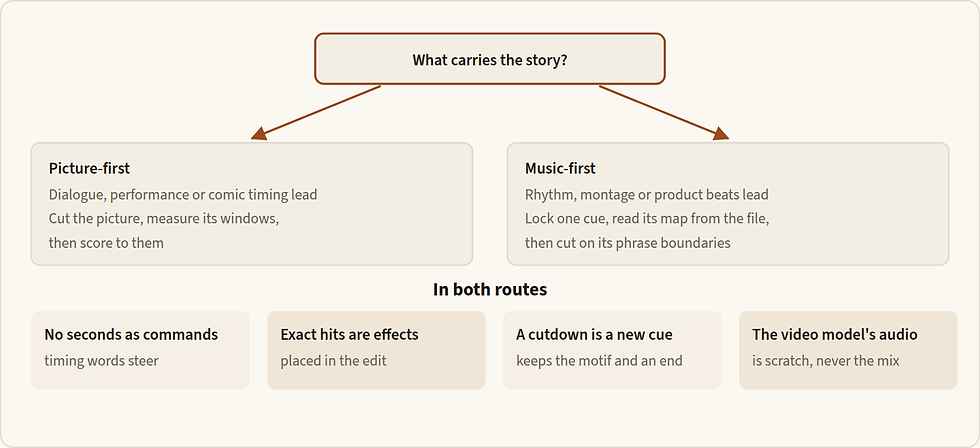
Figure 25.2 — Choose by what carries the story, then keep four rules whichever road you take. The road can differ from one scene of a film to the next.
Four rules hold on both roads.
No seconds as commands. A time in a prompt asks for a feel; the timeline holds the exact time (25.3).
Exact hits are effects. A door, a click, a stop goes on the effects track (25.10), never on a hoped-for musical hit.
A cutdown is a new structure. A 15-second version keeps the first phrase, the figure and a real final note; it is not the first half of the 30 (25.5).
The video model's own audio is scratch, or a rhythm reference, never the final.
Music-first: cut the picture to the cue
The route runs from a written decision to a cut the editor can finish. Its hinge is step 5: before it, everything serves the choice of a cue; after it, everything depends on that cue staying as it is.
Step | What comes out | Check before the next step |
1 Spine and cue sheet | whether music enters, where it enters and leaves | the entry is a picture event |
2 Stillomatic | the scene's real length; the windows, each hard or flexible | total length against the target |
3 Brief the cue | two runs as written, then three candidates | each has an ending, not a fade |
4 Choose against picture | one cue, downloaded; tool, plan and date recorded | it acknowledges the beat without announcing it |
5 Repair, lock, measure | tempo mode chosen; tempo, accents and sections as markers | markers sit on the heard beats |
6 Re-time the stillomatic | every shot's length fixed | cuts on phrase boundaries |
7 Generate the shots | clips with slack at both ends | every clip longer than its slot |
8 Marry picture to the full mix | the cut | cut points repaired by trimming |
9 Hand off the cue | the cue's handoff record (25.16) | every file says what it is |
Lock the cue before any picture depends on it. Every regeneration after that moves your cut points. Then read its timing from the file, cut to its markers, and fit the picture by trimming. Choose the tempo mode when you lock: a fixed grid for a cue the cut will follow bar by bar, the cue's own timing for one that breathes (Chapter 26 says how in Suno). Treat a tempo in the prompt as approximate and measure the chosen file: the cue map is read from the file, never copied from the prompt.
Write the cue map as one line: Cue map — [cue, version]: tempo about [n] BPM · accents at [s, s, s] · sections [name s–s] · ending [s].
Generate every shot longer than its slot. A clip has handles only where the generation gave them (Chapter 14). The cue decides the cut; the trim does the fitting. A video model may be given the cue's percussion alone as a timing reference, never the full mix; whether a clip then lands on the accents is unproven (see the open questions), so the edit places every hit.
Picture-first: score to the cut
The picture-first road
Decide whether music enters at all, and write its job in one sentence.
Make a cue sheet from the rough cut, on the actual timeline and not the script's duration, with each window hard or flexible.
Write the brief in the order of 25.3 and translate it into the tool's fields; ask for an instrumental cue when speech clarity matters.
Explore two or three directions before polishing one, each answering one question; label rejected takes by reason.
Listen against picture at matched level, choose one candidate and mark its usable intervals at phrase boundaries (25.5).
Repair the failing section, and use stems only to clear a competing register under speech or to rebuild a transition.
Put exact hits on the timeline yourself, and deliver the mix, the music without dialogue, any stems and the cue's records (25.16).
The cue is made after the cut is locked, so its entry is placed in the edit and never asked of the prompt, and a regeneration moves nothing in the picture. The price is that the cue is written to windows and a length. A cue that runs long is trimmed at a phrase, not shortened by a new generation.
25.5 Choosing a cue and placing it
This is the editor's half of the work, and it applies to every cue you select, temporary or final. You need the candidates, the picture version the brief was written for, the dialogue at its locked level, and the cue sheet.
From candidates to a placed cue
Listen against picture at matched level, with the dialogue unchanged between candidates, because a louder candidate seems better. Judge the entry, whether speech stays clear, how the phrase develops and how it ends, not only the sound.
Mark usable intervals at phrase boundaries, keeping the attacks and the decays.
Place the first audible attack where the brief says, not the file's start (Figure 25.3).
Repair only the failing section and listen to its seam.
Prepare the layers: the stereo original, the edited cue, any stems. Say what every file is: a generated whole mix, separated from a mix, an independently generated part, recorded, or composer-rendered. Many files are not usable stems.
Verify the export: duration, first audible event, the end's decay, sample rate, channels, clipping, alignment with the reference. Keep the original beside any conversion: the timeline runs at 48 kHz, and a silent conversion hides what you started from.
Put exact hits on a separate effect event, never on a hoped-for musical hit.
Write the handoff record for each version (25.16).

Figure 25.3 — Above: the cue is placed by its first attack, and the silence at the head of the file is trimmed. Below: a cutdown made by halving the full cue ends mid-phrase; a rebuilt one keeps the first phrase and a real final note.
Four more rules. Move the entry before you regenerate: a cue that states the joke too early usually needs its first attack placed later, not new music. End the cue on a button or a decaying tail, never an unconsidered fade; a fade under picture sounds as if the cue ran out. Set the music's level in the edit against the dialogue, and measure the delivered mix (25.14): duck it under speech, or re-balance from stems. Label temporary music as temporary on every draft, under the slate "DRAFT — NOT FOR APPROVAL", and keep each video prompt's own music off, because the music is composed separately.
You hear | Cause | Smallest fix |
The cue enters too early | its placement | move the entry; regenerate only if no interval works |
A jump at the seam between two phrases | the interval chosen | replace that region in the tool, or choose another interval |
The music masks the dialogue | density in the speech range | duck it; then a reduced section, or "sparse under speech" |
It fades instead of ending | no ending in the file | cut to a phrase with a real end; replace the ending |
The export sounds different from the tool's player | gain, or stems doubled under the mix | compare the two aligned before changing the music |
A muddy, crushed sound | a second limiter on a file that arrived loud | one limiter only, in the finished mix |
25.6 Spotting: every event, its frame and its owner
Before any sound is sourced, list every event the picture shows or implies, the frame it happens on, and who owns it, for every scene. There is no fallback: an event nobody spotted is an event nobody makes. Work from the selected takes at their final lengths, the scene's row of the spine and the dialogue locks.
Spotting a scene (in the editing timeline: markers and frame-stepping; no generator)
Play the scene in real time and list every sound the picture shows or implies. Out: a raw list.
Step through each event frame by frame: the contact frame; the start and end of a continuous action; the release. Out: frames.
Split an action wherever it changes: contact, continuation and release on separate rows.
For each row write: event or bed; material and action; perspective; owner (dialogue, ambience, Foley, designed effect, music); planned source. Out: the spotting sheet.
Mark the hard sync points and the dialogue space, and approve the sheet.
Spot the selected take, not the storyboard. A lid that stops two frames later than planned needs its sound two frames later.
Write contact, continuation and release as separate rows. A slide and its stop are two jobs with two timings.
Give every row one owner. A door owned by both the music and the effects gets two hits. Dialogue built in post, such as a voice made to sound distant, is a dialogue row, not an effect.
Mark hard sync points and dialogue space: "the lid's stop and the last note are hard sync points"; "the music must not mask the voice-over".
Spot a clip only after you have accepted it. A door that closes fully has a latch; one that closes halfway has none.
Include what is heard but not seen. An off-screen layer of the bed is a row too, with its perspective.
Put one marker on each row, named as the row, on a timeline at the project's frame rate. It is the workbook's sheet for music cues and sound effects (8.9), with its frames filled in.
Written for this book · beauty and personal care · a spotting sheet for the 30-second face-cream spot of Example 25.1, no tool; its layout is the template for every scene · times are seconds+frames at 24 fps and illustrative: on a real sheet each is read on the selected take · written for this book; not run
Example 25.2 — the cream spot, spotted
SPOTTING — face-cream spot, 30 s — rough cut v2 — 24 fps — times as seconds+frames
Row: shot · time · event (object, material, action, surface, force) · perspective · event / continuation / bed · owner · planned source · hard sync? · dialogue space
1 · 0+00 to 30+00 · one dry small studio, nothing moving in it · close · bed · AMB · record 30 s of the room · hard sync: no
1 · 0+10 · a small frosted-glass jar set down gently on a thick glass shelf: one glass-on-glass contact · close · event · FLY · record, three forces · hard sync: yes
1 · 1+01 · cue 1 enters, one beat after the jar lands · outside the world of the scene · event · MX · cue 1 (Example 25.1) · hard sync: no
2 · 2+14 to 3+02 · the lid turned a quarter turn: fine thread friction · very close · continuation · FLY · record · hard sync: no
2 · 3+02 · the lid lifts free: one soft release · very close · event · FLY · record · hard sync: yes
2 · 3+15 · the lid laid flat on the shelf: one light metal-on-glass contact · very close · event · FLY · record · hard sync: yes
3 · 4+10 to 5+04 · a fingertip presses into the cream, then lifts · very close · continuation, then release · FLY · record the real product; no generated fallback · hard sync: no
4 to 5 · 6+00 to 24+00 · voice-over, a close female voice · close · line · DX · Chapter 21 · dialogue space: music sparse in the middle register
4 · 9+00 to 15+00 · two fingertips spread the cream in a slow circle on the back of a hand: soft wet skin contact · very close · continuation · FLY · record the real product; no generated fallback · hard sync: no
5 · 15+00 to 22+00 · the face in close-up, nothing touching it · close · bed only, no event · AMB · the studio bed · hard sync: no · the voice-over and the cue carry the shot
6 · 24+10 · the lid screwed shut, final stop · very close · event · FLY · record · hard sync: yes
6 · 24+16 · cue 1's resolved last note, decaying through the hold · outside the world · event · MX · cue 1 · hard sync: no · nothing else may fill the beat
6 · 28+12 to 30+00 · music ends; room tone only, to the last frame · close · bed · AMB · the studio bed · hard sync: no
Why it works
Contact, continuation and release are separate rows, each with its own frame: the lid's turn and its release are two jobs.
Every row has one owner. The lid's stop belongs to Foley, so the cue is free of it and its last note is placed after the stop.
A row with no generated fallback says so: the cream's own texture is recorded from the real product.
A clip replaced after spotting means re-spotting that clip's rows only. The sheet is done when every row has a frame, an owner and a source; source nothing before that. The cheapest test: spot one scene of your own on the current cut, and count the rows the plan missed and those the picture no longer needs.
25.7 An effect is a physical event heard from a place
Everything else in this chapter follows from that sentence.
Describe the physics, not the feeling. Object, material, scale, surface, force, speed, distance, the room, and the envelope (attack, body, decay) are more useful than "cinematic". A small steel spoon against thin glass should never come back as a sword hit.
Give the maker's words a force and a scale. "Impact" and "braam" are the makers' own words, and they are useful once they say how big: "impact" alone is any collision from a tap to a crash, so write "a light impact of a steel spoon on a thin glass". "Cinematic" and "epic" name the average and are not used.
An event has a frame; a bed has a duration and a join. A tap is a short event with air around it; a fan is a continuous bed; a staircase may need each footfall plus the cloth, rather than one composite file whose timing cannot change.
Separate what the edit must move separately. A tool may accept several elements in one prompt; prefer separate files whenever the elements need their own placement or level.
Timing belongs to the edit. Most generators take a length at most; Adobe Firefly alone takes timing into a generation, through your voice (Chapter 28). The edit places everything.
Source truth beats beauty. Ask whether it sounds like this object, at this force, from this distance; a beautiful effect can be wrong for the object.
Words that work, by job.
Job | Words |
Material | steel, thin glass, thick glass, frosted glass, porcelain, corrugated cardboard, paper, vinyl tablecloth, hard plastic, leather sole, dusty concrete, wood, heavy cotton cloth |
Action | taps, set down, slides, drags, stops against, scrapes, plants, unscrews, snaps, rustles, stirs, clicks |
Force and speed | lightly, gently, firmly; slowly, quickly; once |
Scale | a small steel spoon; a light impact; a heavy oak door; quiet domestic scale |
Perspective | close, medium, distant; through a wall; behind a closed window; far below; off-screen |
Space | small tiled kitchen, dry small room, stairwell with a short hard echo, open street between buildings |
Envelope | sharp attack, soft attack, brief ring, damped, short dry decay, natural tail |
Refusals | no music, no voices |
Here is one event taken apart.
A small steel teaspoon lightly taps the rim of a thin tea glass once. Close dry recording, a small bright contact with a brief glass ring, quiet domestic scale.It says, in order: the object, its size and material (a small steel teaspoon); the action and force (lightly taps); the surface, and "once", so one event (the rim of a thin tea glass); the perspective and space (close dry recording); the attack (a small bright contact); the decay and how long (a brief glass ring); and the scale, so the model does not reach for a bigger object (quiet domestic scale). "Spoon" alone gives a generic clink; the material and the stop give you the sound you saw.
One event per file; a composite only when its parts' timing is fixed together. A match struck and catching has a scrape, a rush and a fade in an order that never changes; a box that slides and stops does not, and its slide and stop are made apart so the stop can be placed.
Write the same physical description for every tool, and never carry one tool's controls into another's words. Each tool section cuts the description to its dialect (Chapters 23 and 28).
The fill-in form for one effect, with the maker's settings beside it, is the sound-event template of 23.4; Chapter 28 has the forms for the other tools.
25.8 Record, library or generate
For every spotted row, decide where the sound comes from. It is a production choice, not a rule that a generator is more modern.

Figure 25.4 — The route for one row. Record when the prop is at hand, license a library file when the sound is ordinary, generate only what neither can give, and write the route and the reason on the row.
Record the prop when it is at hand and quick to control. A recording can be the strongest reference and the final sound.
Search a licensed library when the sound is ordinary: a door, a car pass, a street. Search with what, how, where and the material ("glass on oilcloth, single tap, close, dry room"), and write the library, the file and its licence on the row. Without them, nobody can clear the mix.
Generate only when a specific texture or performance is missing. Never regenerate a correct sound to call the film "AI".
Keep a pack consistent: one microphone position, one room, one distance. Five product sounds recorded in five rooms will not cut together. Record close and dry, and add distance and room in post (25.9).
Treat a video model's own audio as a candidate layer only, judged by Chapter 21's checks before any of it is kept.
A recording pass must match exactly what is seen: the actor's shoes and the ground (boots on gravel, heels on marble), the rustle of every fabric that moves (a leather jacket is not a silk dress), every prop handled on screen (keys, a phone, plates, paper), accessories (jewellery, bags, zips), and each surface a hand meets, recorded separately with specific words ("close, shut, clank", not just "close").
For a session, fix one microphone position and one room; record each event at several forces, with air before and after; slate each take with its object, material and force; and pick by source truth against the picture. Record the object the take shows: a thicker glass or a different spoon is a different sound. Room noise means recording again elsewhere before cleaning it. If a sound cannot be performed with what you have, generate it and say so on the row.
The job | The route | Where |
A prop is at hand | record it | above |
An ordinary sound | a licensed library | above |
One isolated event or a short bed, described in words | ElevenLabs sound effects | |
An event whose timing you can perform with your voice against the picture | Adobe Firefly sound effects | |
A recording of yours to remake, or one region of an effect to redo | Stable Audio 3 | |
A cue that meets picture | Suno | |
A cue built as timed sections, for online delivery its licence allows | Eleven Music | |
A short music clip or a full song to audition | Google Lyria | |
Exact ownership, exclusivity, or timing to the bar | a composer or a licensed library |
Write the route on the row: Row [n] · route: [record / library / generate: tool] · because: [prop at hand / ordinary sound / missing texture or performance] · fallback: [route].
25.9 Perspective: distance, room and off-screen
Make each sound come from where the story puts the listener. First decide the scene's listening position and write it on the sheet; then give every event and bed its distance, its room, and whether it is on screen or off. Where one sound must serve several distances, record or generate it close and dry and add the distance and the room in post. Then play across the cuts.
Decide the listening position per scene, and keep it; change it only on purpose, and say so. The Mastorna plan holds a natural position and moves it twice on purpose: the cabaret is "heard through curtains/walls", and at the recognition the station noise is "muted/filtered as if underwater", a subjective position for one shot. A position that changes without a note is a mistake.
Change level and tone together with distance. A heavy thud played quietly still sounds like a heavy object; reduce the force words, do not only lower the fader.
Write an off-screen source as heard through something: "through a thick wall", "behind a closed wooden shutter", "four floors below". Naming an unseen source is safe in a sound prompt; it is picture prompts that draw named objects into the frame.
No intelligible off-screen voices unless they are scripted and approved. An overheard sentence becomes a line the audience follows.
A close sound on a wide shot that nobody chose means reducing the force words and adding distance in post. A street that comes forward is generated separately and lowered in the mix. A bed that keeps carrying foreground events goes to a library or a recorded bed. The cheapest test: generate a distant street and one horn as two files, lay them under a held beat in a scene of your own, and listen from the position you chose.
25.10 Timing to the frame
Probe each clip's frame rate before you time anything (Chapter 14). At 24 frames per second one frame lasts about 42 milliseconds, and at 30 about 33, so "near the contact" is not "on it". Put each event's audible transient on the frame of contact, and lay each continuous action between its onset and its stop.

Figure 25.5 — Every file carries some silence before its sound. Placed by its start, the sound lands late; placed by its transient, it lands on the frame the eye sees.
Placing an event (in the editing timeline or an audio workstation)
Trim the head padding; keep the attack.
Find the transient in the waveform.
Put the transient, not the file start, on the contact frame.
For a continuous action, lay it from the onset of the motion to the stop; the stop is its own transient.
Judge it in real time first, then frame-step: a sound that looks right on the waveform can still feel late.
Keep the raw file, and write the offset (where the transient sits in the file) on the row.
Lay footsteps on the plant frames only: never a step while the foot is in the air, never two identical steps side by side.
A hard sync point is seen and heard on the same frame. In the Mastorna plan the orchestra stops together at the word "accettarla!" and the room falls silent. No prompt can ask a music model for that stop to the frame, so the cue is made to run up to it, and the stop itself is placed on the frame, or cut, in the edit.
Fix timing in the timeline, never by regenerating. Firefly can pre-time a generation with your voice; the edit still places it.
A tail cut short means moving the out point, not the transient. If an event cannot be placed without cutting its wanted decay, source a single-hit version.
Write the placement on the row: Row [n] · file [name] · transient at [s] in the file · placed on frame [n] of [clip] · real-time check [ok / late / early] · raw kept [y].
25.11 Beds, layers and room tone
A bed is the continuous sound that holds a scene together across its cuts: named layers over a floor of room tone. Every scene has one. Build depth as a constant base (room tone, a distant hum of traffic) with discrete detail over it, kept evolving rather than looped, because a scene without ambience sounds flat, artificial and cut off from its pictures. Record an ambience on location where you can; otherwise mix several library files so that nothing repeats.
Building a bed
Name the layers: one constant, an intermittent detail, a rare accent, over the room tone. Out: the bed plan.
Source each layer as its own file, long enough for the scene or cleanly looping.
If it loops, audition the join, and reject a periodic bump.
Lay the whole bed under every cut of the scene.
Duck or remove the clips' own beds under it.
Check that no layer masks a line.
Lay one bed under every cut of a scene; never start a new fan at a shot boundary. A video model's native bed differs from take to take; yours does not.
Build a bed from named layers, each in its own file. Then you can move the rare accent into the held beat, and lower the street under a line.
Loop only when you need it and the tool supports it; audition the join.
Keep room tone as the floor under silences and dialogue edits. A written silence still has its room; room tone bridges an edit in a line.
Allow no intelligible voices in a bed unless scripted and approved, and refuse the default codes: not a football match, not a serial, not an old song on the neighbour's television.
A bed is a place, and a place is a list. The station in the Mastorna plan is "steam release, train metal, wheel grind, luggage wheels, distant whistles, blurred loudspeaker fragments, echoing public flow, and layered foot traffic", closed by refusals: "No clean modern announcements, no sleek high-speed rail cues, and no theme-park steam effects." A list that packs six elements into one file is right for a bed and wrong for an event, because the mix cannot lift the luggage thump into a frame of its own: when an element must land on a frame, make it as its own event and keep it out of the bed's words. A bed that is too even to be a place needs a longer list, never more adjectives. An element that comes forward means lowering the bed and making that element alone; a layer that keeps failing goes to a library or a recording. The cheapest test: loop the constant layer to the scene's length and listen to every join in real time.
Write the bed plan as one line: Bed — [scene]: room tone [description] · constant [layer] · intermittent [layer, when] · rare [layer, where] · loop [y/n, join checked] · refusals [codes the scene avoids].
25.12 Designed transitions and sound bridges
Some sound is stylised on purpose (a material sweep into a macro, a whoosh on a whip pan); some carries across a cut (an impact whose tail leads into the next space). Both are made only when chosen. A whoosh on every cut is a template, not a decision.

Figure 25.6 — A bridge built in the edit, from two files: the door's contact on its frame and its tail running on; the next space's bed already under the outgoing shot, holding one perspective across the cut.
Decide that the transition is a choice, and write down what it does. Tie it to a material the film already owns, source it as its own file, and place it: a bridge starts under the outgoing shot's last frames, holds one perspective across the cut, and opens into the incoming shot. Shape its envelope in the edit rather than by prompting again.
Build it from a material the film already owns: the product's glass for a beauty macro; the scene's cloth for a whip pan, or a real cloth snapped past a close microphone.
No large bass impact by default, and never a new onset exactly on the cut.
Carry a scene's sound across the cut into the next space as a J-cut or an L-cut (Chapter 29 builds them).
An exact hit is an effect, not a musical hit: a door at a frame is an event on the effects track, and the cue stays free of it.
The Mastorna plan uses a bridge. At the cabaret door its note reads "nightclub diegetic music bridges to Title B": a sound from the scene runs on over the cut into the title card.
Write the transition on the sheet: Transition — cut [out shot → in shot] · job [what it does] · material [the film's own] · source [record / generate] · starts [frames before the cut] · holds [perspective] · opens [into the incoming shot].
A transition that sounds like a new object off screen needs less density and no impact words; one that announces every cut is removed. If it keeps sounding generic, record the material.
25.13 Repairing a placed sound
Fix a placed effect with the smallest change, and in this order: timing, tail, perspective, repetition, source truth. Name the symptom in one line, class it, make one change, and judge again in real time, in the cut. Work in the timeline first; a new generation or recording comes last. Go easy on reverb and pitch-shifting, which make a sound unnatural and muddy speech, and do not expect equalising to rescue a physically wrong source: replace the source.
You hear | Class | Smallest fix | Then |
Hits late or early | timing | slide the transient to the contact frame | — |
Several contacts | repetition | a single-hit candidate, or trim | record |
Ring or tail too long | tail | trim or fade; "damped, short dry decay" | a fuller glass, a smaller room |
Too heavy | perspective | reduce the force and weight words | record it lighter |
A close sound on a wide shot | perspective | distance and room in post | or was it a chosen subjective emphasis? |
Loop bumps | repetition | a longer file | a library bed |
A musical hum in a bed | source | a simpler request: the fan alone, "no tones" | a library or recorded bed |
A trailer thud | source | give "impact" a force and a scale; remove "cinematic" | record |
The bridge starts on the cut | placement | start it under the outgoing frames | — |
An effect masks a line | level | lower or move the effect | a different take |
When repairs of one class keep failing, change the source. Note every repair on the row (symptom, class, fix, result), and keep the raw file.
After a generated sound returns
One contact, not several.
The object's size and material, not a bigger one.
The room and the distance fit the shot.
No music, voices or whoosh.
Raw file kept; settings recorded.
25.14 Loudness to the delivery specification
Loudness is set and measured in the finished mix, against the specification the delivery owner names, and never typed into a generator or fixed by a second limiter.
Measure it with a BS.1770 meter over the whole programme, which EBU R 128 s1 says should be measured "in its entirety, without emphasis on specific foreground elements such as speech, music or sound effects". Two published families cover a short spot (checked 30 Sep 2026): a European broadcast spot at −23.0 LUFS integrated with true peak not above −1 dBTP (EBU R 128), and a US broadcast spot at −24 LKFS with true peak not above −2 dBTP (ATSC A/85). Their tolerances, the short-term limit, the streaming ranges and the working defaults for a client who names nothing are in 30.6, where the finished file is measured. For Egypt, Saudi Arabia and the Gulf, cinema advertising and the social platforms, no publisher's figure was found: ask the delivery owner for the specification in writing, and record the answer.
25.15 Rights
Every file carries its rights line (34.10), and a generated file's line names its maker and product, plan, model, medium, dates, uploads and the terms read. A recording is yours; a library's licence names what you may do; each generator's terms differ, change, and sometimes exclude film, television or a free plan. What each maker permits is in the Limits, prices and rights section of its tool (23.9, 26.9, 27.9 and 28.9), and Chapter 34 teaches the line across the whole job. A file whose terms are unread stays out of a client final. Write the rights line on the row when the file is made, not when the client asks.
25.16 The handoff to the mix
Deliver sound the mixer can balance, move and replace: separable layers, raw and placed versions, and the sheets. Every scene. When a layer cannot be separated, export it again from its source before delivery.
Handing over a scene (the editing timeline or an audio workstation; the delivery folder)
Lay the tracks: dialogue, ambience, Foley, designed effects and music, each separable. A composite preview is useful for review; it is not a handoff.
Name every file by scene, event, source and version.
Keep the raw, processed and placed versions of every effect.
Write the handoff sheet: per row, the file, frame, offset, source, settings and rights.
Check every line for masking: "the music must not mask the voice-over".
Slate a draft "DRAFT — NOT FOR APPROVAL"; when you want a decision, "ROUGH CUT vN — FOR EDIT DECISION: [the question]". Every export carries its version.
Template: the handoff sheet (written for this book; not run)
HANDOFF — [project] [scene] — cut [name, date]
Tracks: DX [ ] · AMB [ ] · FLY [ ] · SFX (designed) [ ] · MX [ ]
Row [n] · file [name] · frame [n] · offset [s] · source and settings [ ] · raw / processed / placed [y/y/y] · rights [the 34.10 line]
Masking check: [lines checked] · Slate: [DRAFT — NOT FOR APPROVAL / ROUGH CUT vN — FOR EDIT DECISION: … / final]
Every version of a cue goes to the edit with a record, so that the editor who opens the project next week can rebuild your placement and answer any question about where each file came from without asking you.
Template: the cue's handoff record (written for this book; not run)
Cue [id] v[n] — handoff for picture [cut name, date]
Selected stereo reference: [file] · source in/out: [s–s] · start origin on the timeline: [timecode]
Actual duration: [s] · tempo mode: [fixed grid n BPM / original timing]
Hard events: [what, s] · flexible structure: [what may move] · endings: [full length / cutdown, how made] · handles: [s head / s tail]
Files: [name] — [generated whole mix / separated from the mix (tool, date) / independently generated part / recorded / composer-rendered]
Checks: sample rate [n] · channels [n] · clipping [none] · start / middle / end against the reference [ok / offset]
Rights line (34.10): [as written when the file was made]
Name files [project]_CUE-[nn]_[A|B|C]_v[n].wav for a cue and [project]_CUE-[nn]_v[n]_STEM_[part]_separated-[tool]_[date].wav for a stem, and give music its own tracks with any stems below and the cue map as markers.
25.17 Checks and the gate
Before you sign the sound
The sheets match the cut you are signing: every event has one owner and a frame read on the selected take.
Candidates were compared at matched level with the dialogue unchanged; exact hits sit on the effects track.
One bed runs under every cut; no layer masks a line; no intelligible voices unless scripted and approved.
Loudness is measured over the whole mix against the delivery owner's specification, and the specification is recorded.
Every file has its route, settings, raw version and rights line; you listened on speakers and on headphones, at delivery loudness.
The acceptance gate is yours: sign the placed track in the running cut, not a prompt and not a file heard alone. Then hand on: Chapter 29 locks the cut, Chapter 30 finishes and measures the file, and Chapter 31 hands over the folder.
Open questions
Whether a video model given a cue's percussion lands its action on the accents. No maker documents it. Treat any such clip as a rough guide, and place every hit in the edit.
The loudness specification for Egyptian, Saudi and Gulf broadcasters, cinema advertising and the social platforms. No standard covers them (30.6). Ask the delivery owner in writing, and record the answer.
What to remember
The edit owns all sound. A video model's own audio is scratch, and every sound in the film is a file with a row, a frame, an owner and a rights line.
Write the spine first: motifs, five layers, and silence as a cue, in two kinds. Feeling belongs to the spine; physics belongs to the prompt.
Brief a cue around a theme, in eight parts, with the refusals apart and no artist named. For a spot, one small figure that survives the cutdown.
Choose the road by what carries the story. Lock the cue before any picture depends on it; place its first attack, not the file's start; a cutdown is a new structure.
Spot every event on the selected take: contact, continuation and release as separate rows, one owner each, hard sync points marked.
Describe an effect as a physical event heard from a place. Record when the prop is at hand, license a library file when the sound is ordinary, generate what neither gives.
Put the transient on the contact frame, one bed under every cut, and a designed transition only when it is chosen. Fix timing in the timeline, never by regenerating.
Loudness is measured over the whole mix against the delivery owner's specification: EBU R 128, −23 LUFS and −1 dBTP; ATSC A/85, −24 LKFS and −2 dBTP. Never set it in a generator.
Hand over separable layers, raw and placed, with the sheets and the rights line.
Next: Chapter 26 · Suno


Comments